
 Resolved by


Dear; Can anyone help me to create a custom Movement Panel to control this brushless motor controller on ARC for EZB Builder? I would greatly appreciate it.
Thanks
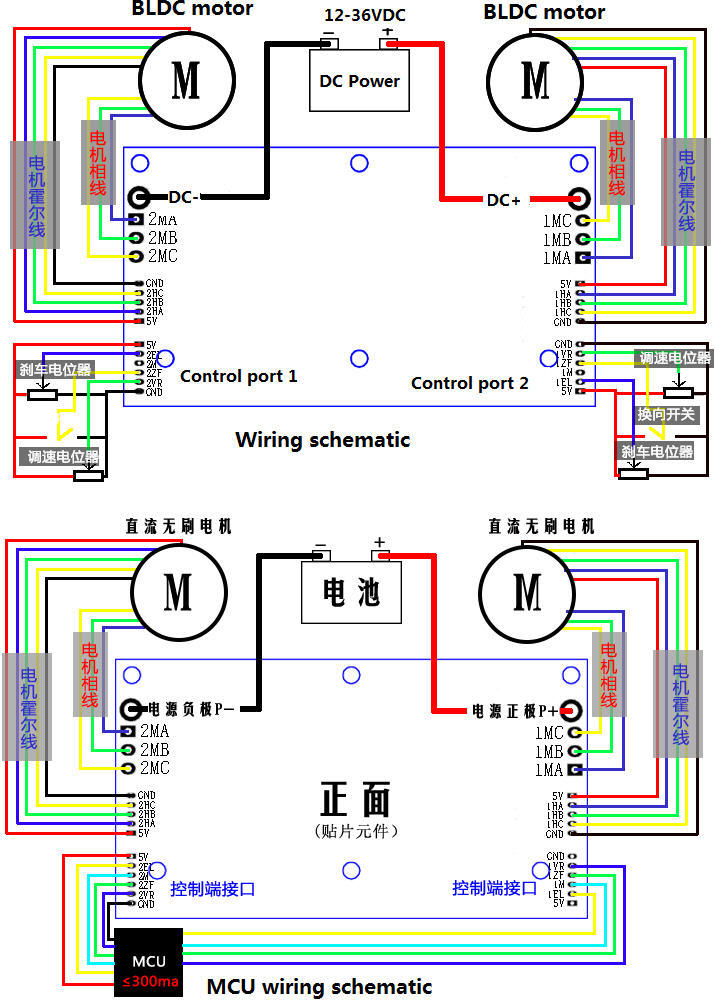
- Control port GND:Only for control signal VR:Speed regulation,(0-2.5V or 0-5V linear speed regulation).PWM frequency:1K-5KHz. ZF:Forward and backward control(5V high level or 0V low level,if you use 3.3V MCU,you need do adjustment to 5V) M:speed pulse signal output EL:brake function, 0-2.5V or 0-5V linear brake 5V:5V power source for external control device(300mA)
- Power port MA ----motor phase A MB ---- motor phase B MC---- motor phase C P- ----DC- P+----DC + 3:Hall sensor port Ha--- Hall a Hb--- Hall b Hc--- Hall c GND---GND 5V---5V input 4:Remarks


Might want to try the latest build here: https://synthiam.com/Support/Skills/Movement-Panels/Brushless-Motor-Movement-Panel?id=20526
Thank you very much! Problem-solved.
josephcjosephc
Did you get motor control working and are you using it with slam, navigator or tracking/follow. thanks Scott
I got it to work with the latest updated Brushless- Motor Movement-Panel and DJ Sures big help. I could not add the navigator movement joystick for the membership fees.