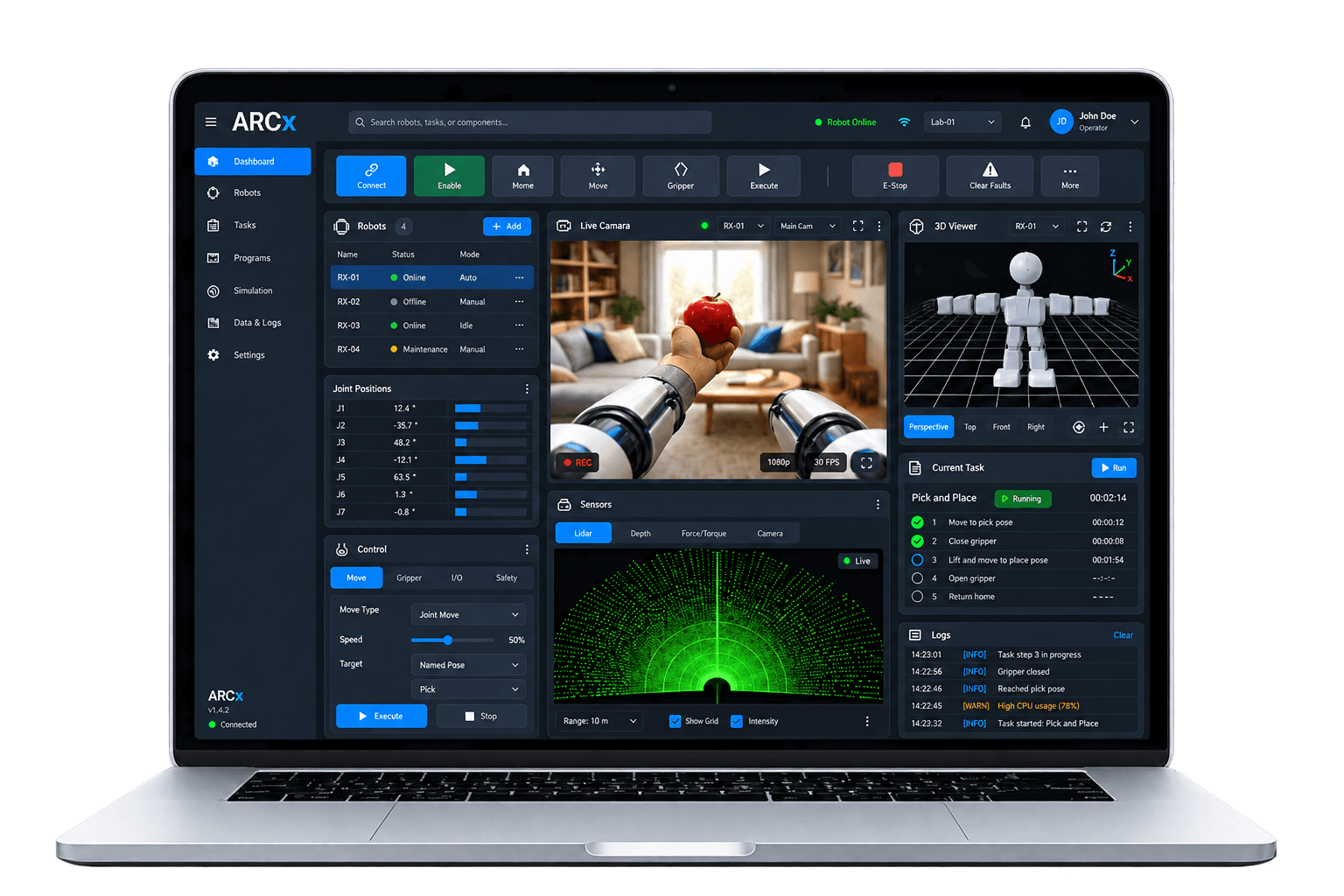
Robot software that runs without a screen
Install ARCx on a Windows or Linux computer, including a Raspberry Pi running Ubuntu 24.04. It runs headless, so the robot does not need a monitor or keyboard. Open the programming interface from a browser on the robot's computer, or on another device on the same network.
Close the browser and the robot keeps working. Add Robot Skills for cameras, speech, servo control and other tasks as your project grows. You can configure, add or remove skills without restarting ARCx.
 For robot builders, enterprise & industry
Robot software built for products and the factory floor
ARC is designed for DIY projects and education. ARCx brings Robot Skills, Blockly and scripting to commercial robots and industrial automation. Install it on your robot's computer, configure it to run unattended and connect remotely for programming and maintenance.
- Commercial robot products
- Industrial automation cells
- Service & hospitality robots
- Inspection & security robots
- Telepresence & kiosks
- Research & R&D labs
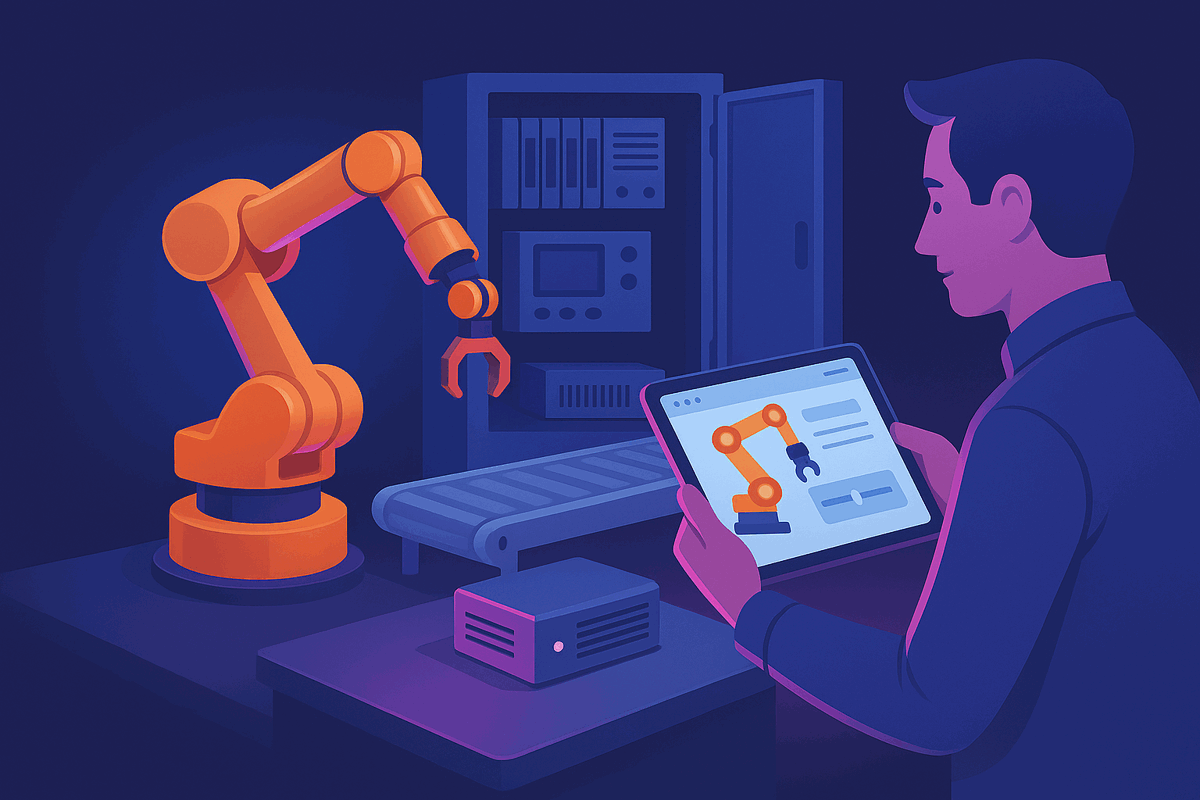
Connect to industrial PLCs
The Industrial PLC Controller robot skill connects to PLCs from Allen-Bradley, Siemens, Omron, Beckhoff and other manufacturers over Modbus, OPC UA, EtherNet/IP and Siemens S7. Use the built-in simulator to test before connecting to production equipment.
Install on your robot
Install on the robot's own Windows 64-bit, Ubuntu 24.04 x64 or ARM64 computer. It runs headless with .NET bundled, so there is no monitor, keyboard or desktop session to support in the field.
Runs unattended
Launch ARCx with a project and its startup script runs by itself, so a robot can power on, connect and start working. It keeps running when every browser disconnects.

Isolated Robot Skills
Every Robot Skill loads in its own isolated context with its own error boundary. If a skill encounters an error, ARCx reports it while the rest of the project continues running.
Secure access to deployed robots
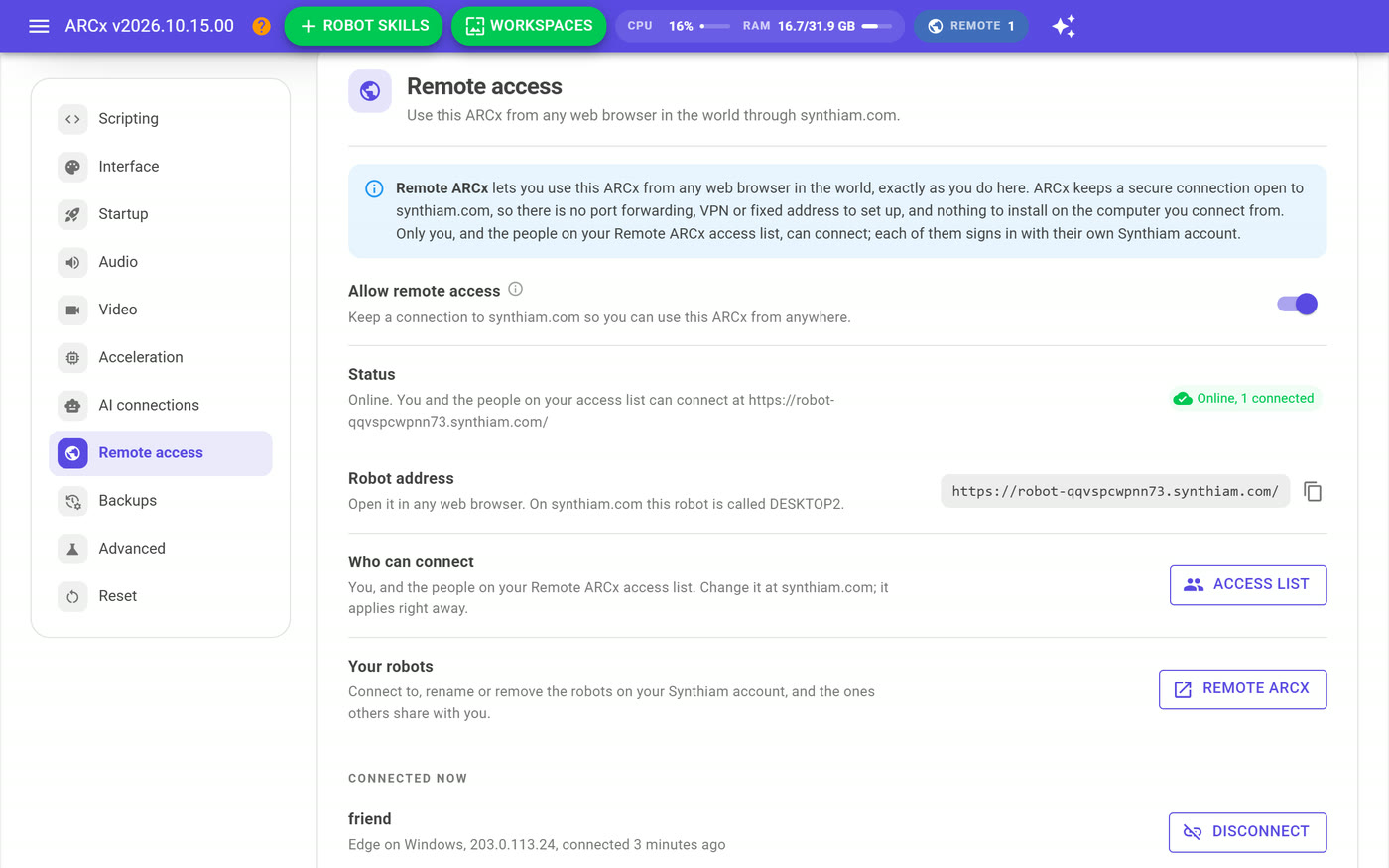
Private by default, HTTPS with your own certificate, and Remote ARCx for field service from anywhere: an outbound connection with Synthiam sign-in and an access list, and no port forwarding or VPN.
Connect to other systems
Bridge to ROS 2, let AI agents work over the MCP server, give operators Custom UI screens on tablets and kiosks, and write your own Robot Skills for in-house hardware.
Jump to a feature
ARCx robot programming features
Run the robot software on board and use your browser to program, configure and control it.
Windows, Linux and Raspberry Pi
ARCx runs on Windows 10 and 11 (x64) and on Ubuntu 24.04 LTS for x64 and ARM64, including Raspberry Pi. .NET is bundled, so there is nothing else to install. Individual Robot Skills list which operating systems they support.
No screen required
ARCx runs on a single-board computer without a monitor or keyboard. Use its browser interface to work on the robot without a remote desktop session.
Program robots from a web browser
Open ARCx in a browser on your laptop, tablet or phone to program and drive the robot over your network, or from anywhere with Remote ARCx. You do not need to install ARCx on that second device or set up remote desktop software.
Connect from multiple devices
Several people can connect to the same robot at once, with live updates in every browser. You can also use a phone and laptop together while working on a project.
The robot keeps running
Robot Skills run separately from their browser interface. Closing a browser session leaves ARCx running on the robot, so you can disconnect your laptop while the project continues.
Adjustable display and dark mode
The interface adjusts to your screen size. Zoom in for larger controls or out to see more of the workspace. Use your browser's light or dark setting, or choose a theme in Preferences.
Local access by default
By default, ARCx only accepts connections from the computer it runs on. Start it with a bind address to reach it from your network, and add your own certificate to serve it over HTTPS. Turn on Remote ARCx to reach it from anywhere, for you and the people you choose, without opening a port.
Skill error handling
Each Robot Skill loads in its own isolated context, and each skill window has its own error boundary. If a skill encounters an error, a message appears in its window and in a popup while the rest of the project continues running.
Automatic project startup
Launch ARCx with a project file and it opens on start-up. A project's startup script runs after a visible countdown you can cancel, so a robot can power on, connect and begin its routine by itself.
 New · Remote ARCx
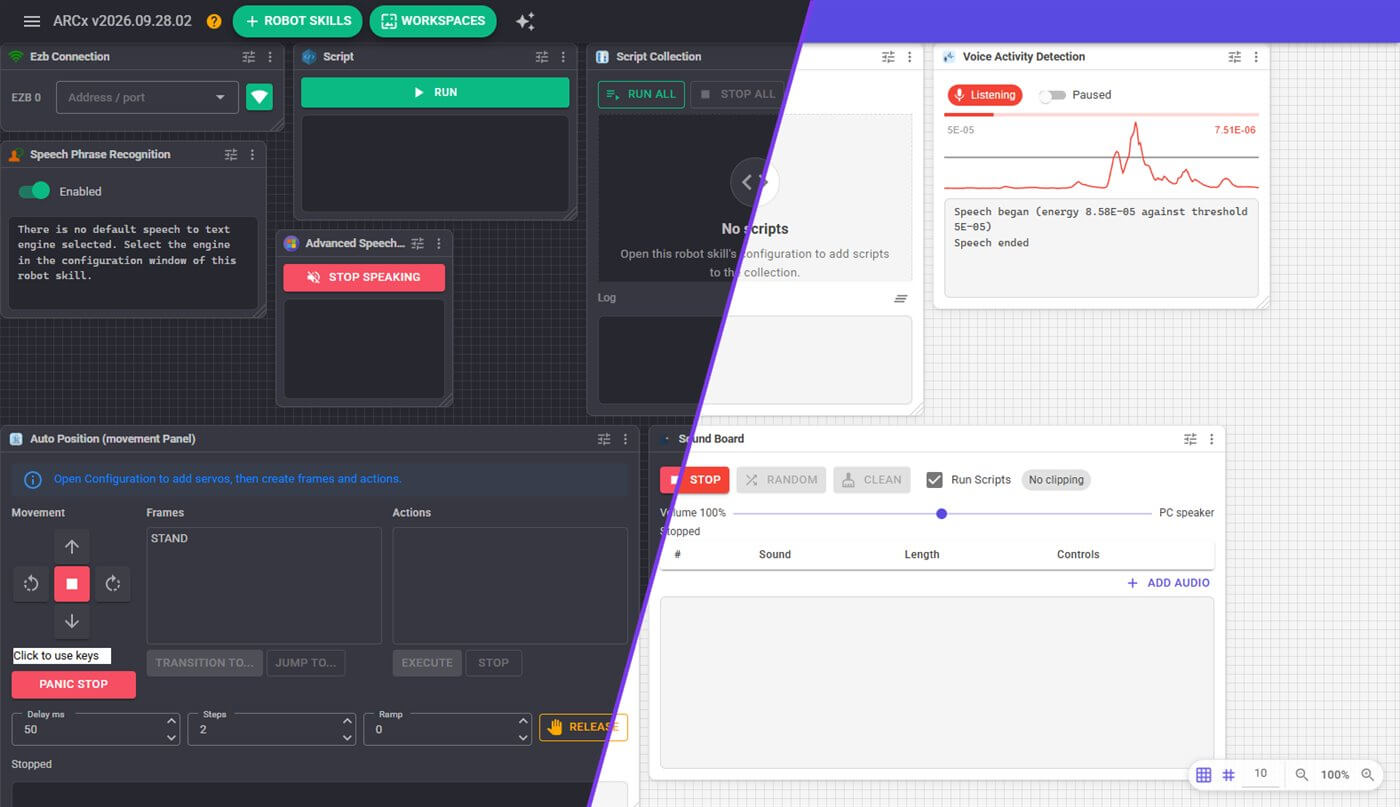
The same workspace in the dark and light themes. Every window is a live Robot Skill.
Organize your Robot Skills into workspaces
- Multiple named workspaces. Spread skills across several desktops instead of one crowded screen. Add, rename and reorder them from the Workspaces menu.
- Adjustable window layout. Drag and resize skill windows, choose the grid size, and zoom the whole workspace with Ctrl and the mouse wheel.
- A menu on every window. Configure, move to another workspace, duplicate, open full screen, bring to front, open its help, or remove it.
- Full-screen skill view. Open one skill's interface on its own page — handy on a tablet mounted to the robot.
- Consistent configuration pages. Every skill's settings open in the same full-page editor, with a Window tab for the title scripts use to reach it.
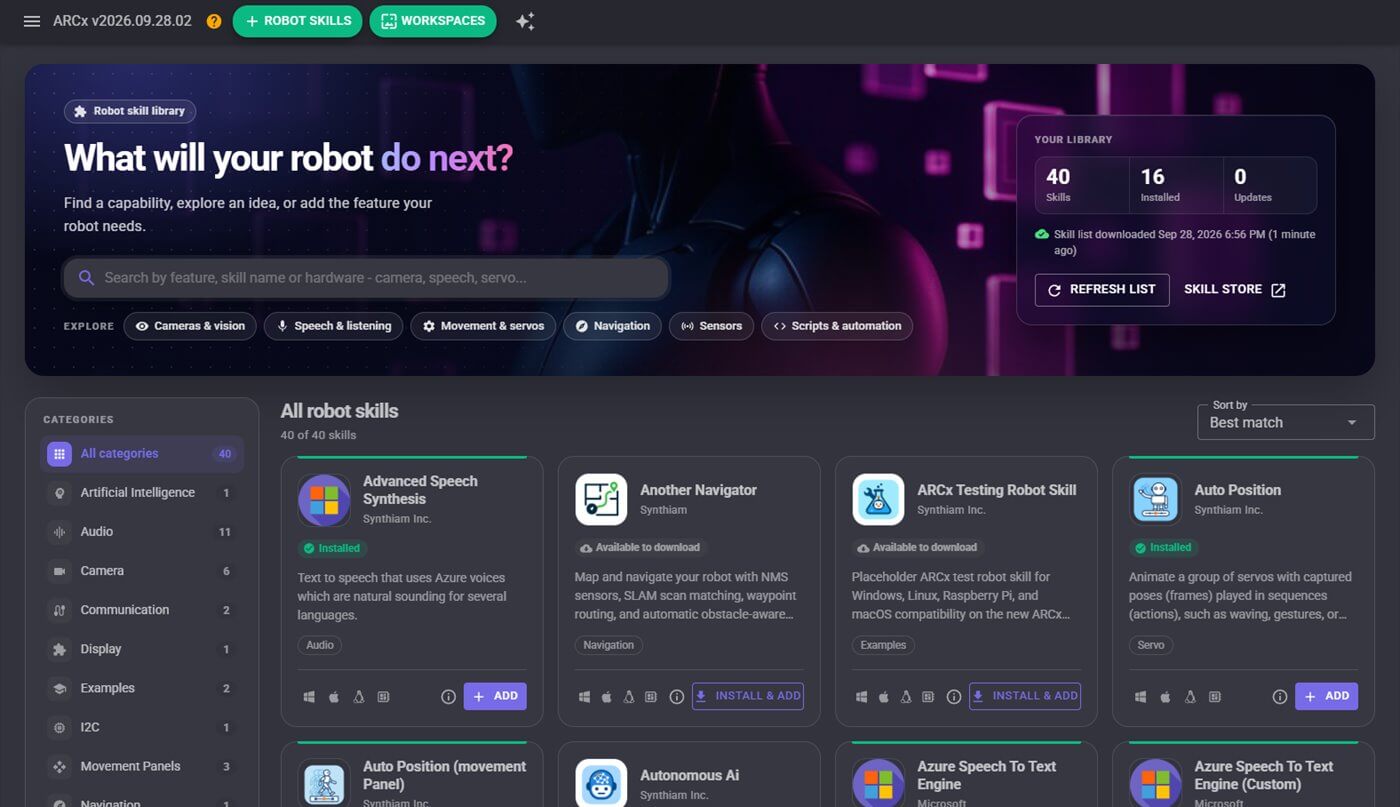
The robot skill library: search, filter by category or publisher, and install in one click.
Robot Skills for cameras, speech and movement
Cameras, movement panels, speech, scripting, tracking, connections — each is an independent module with its own interface, added only if you need it.
- Add and remove while the robot runs. Skills load and unload without restarting the platform.
- Search the Robot Skill Store. Filter by category, publisher, installed or not installed, and sort by best match. A skill can belong to several categories.
- Install and add in one step. Skills that are not on this computer yet download, install and appear in your project with a single click.
- Skills declare their platforms. Platform icons on every card show where a skill runs, so you know before you add it.
- Stay up to date. Update badges show which installed skills have a newer version, and ARCx can update them automatically at start-up.
- Recently used, one click away. The Robot Skills menu lists the skills you last added, and any skill can be duplicated from its window menu.
Program robots with Blockly, JavaScript and Python
Build robot behaviors with Blockly visual programming, or write scripts in JavaScript and Python. All three use the same script API to control hardware and work with Robot Skills, and are available in the same full-screen editor.
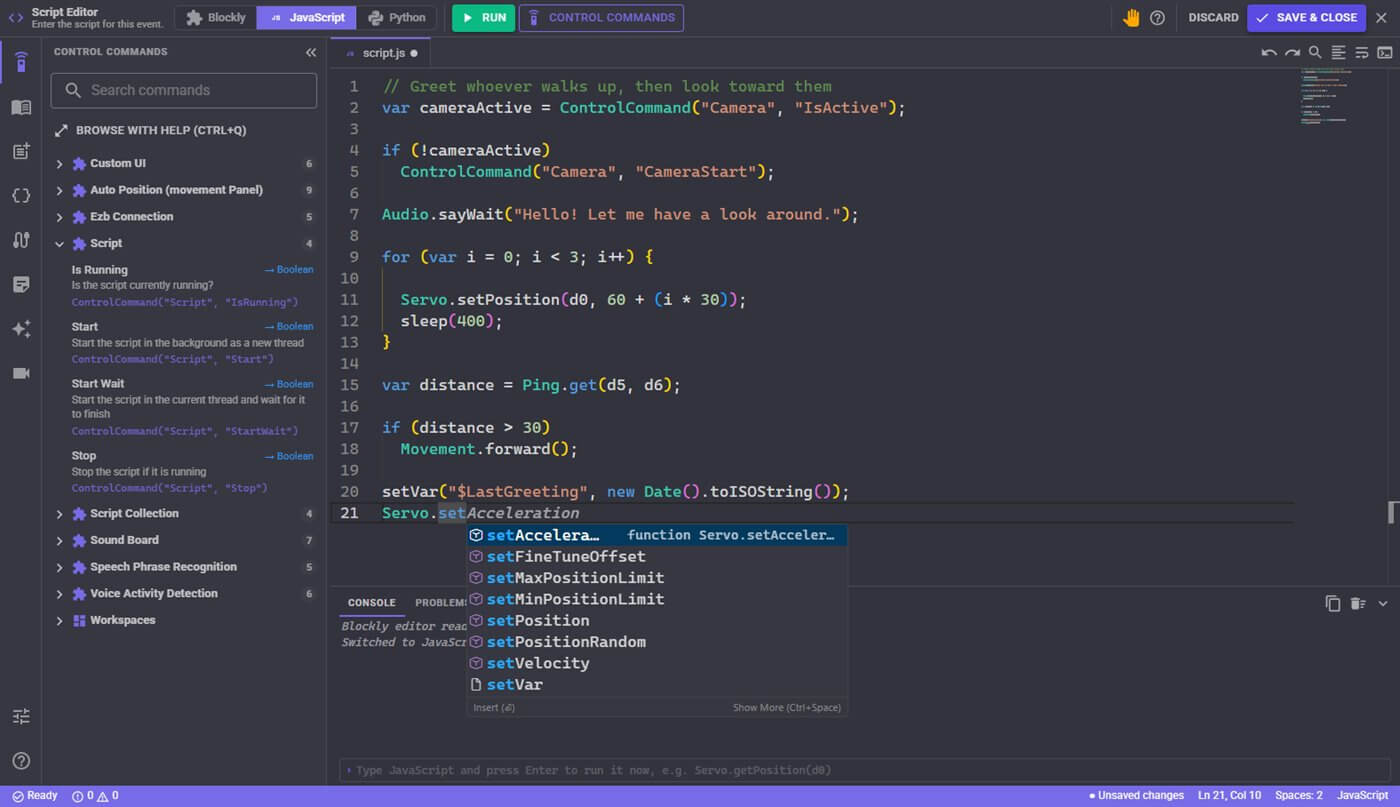
The script editor: IntelliSense for every ARCx command, with each skill's control commands in the sidebar.
- VS Code editor features. The editor is built on the same engine as Visual Studio Code, with syntax highlighting, a minimap, word wrap, formatting and IntelliSense for every ARCx command.
- Error reporting. Syntax errors and the last run's errors appear in a Problems panel. Click one to jump to the line.
- Interactive console. Script output appears in the console, and a one-line prompt runs any expression immediately, such as reading a servo position.
- Keyboard shortcuts. Ctrl+S saves, F5 or Ctrl+Enter runs, Shift+F5 stops.
- A panic button. One click stops the script, stops movement, releases the servos and stops audio.
- Editor sidebar. Control commands, the full ARCx API catalog, snippets with tab stops, global variables, ports, project notes, a live camera view and help.
- Hover help on every command. Control commands show their description, parameters and return type in the editor.
- Autocomplete for your project. Typing a control command or a global variable name suggests the ones that exist in this project.
- An AI script assistant. Describe what the script should do and the assistant writes, inserts or replaces JavaScript or Python, knowing the control commands of the skills in your project.
- Control commands that return values. Robot skills talk to each other with control commands, and a command can return a value to your script.
// Start the camera if it is not running yet
var cameraStatus = ControlCommand("Camera", "IsActive");

if (!cameraStatus)
  ControlCommand("Camera", "CameraStart");

Audio.sayWait("Hello! Let me have a look around.");
Servo.setPosition(d0, 90);
A script checks the camera status before starting it.
- JavaScript runs on an embedded engine with syntax checking before the script starts.
- Python runs on an embedded IronPython 3.4 engine with its standard library. For CPython with pip packages such as numpy or OpenCV, add the Python Native robot skill.
- Global variables are shared by every script, skill and Custom UI widget in the project.
- A script monitor lists every running script with its status and a stop button.
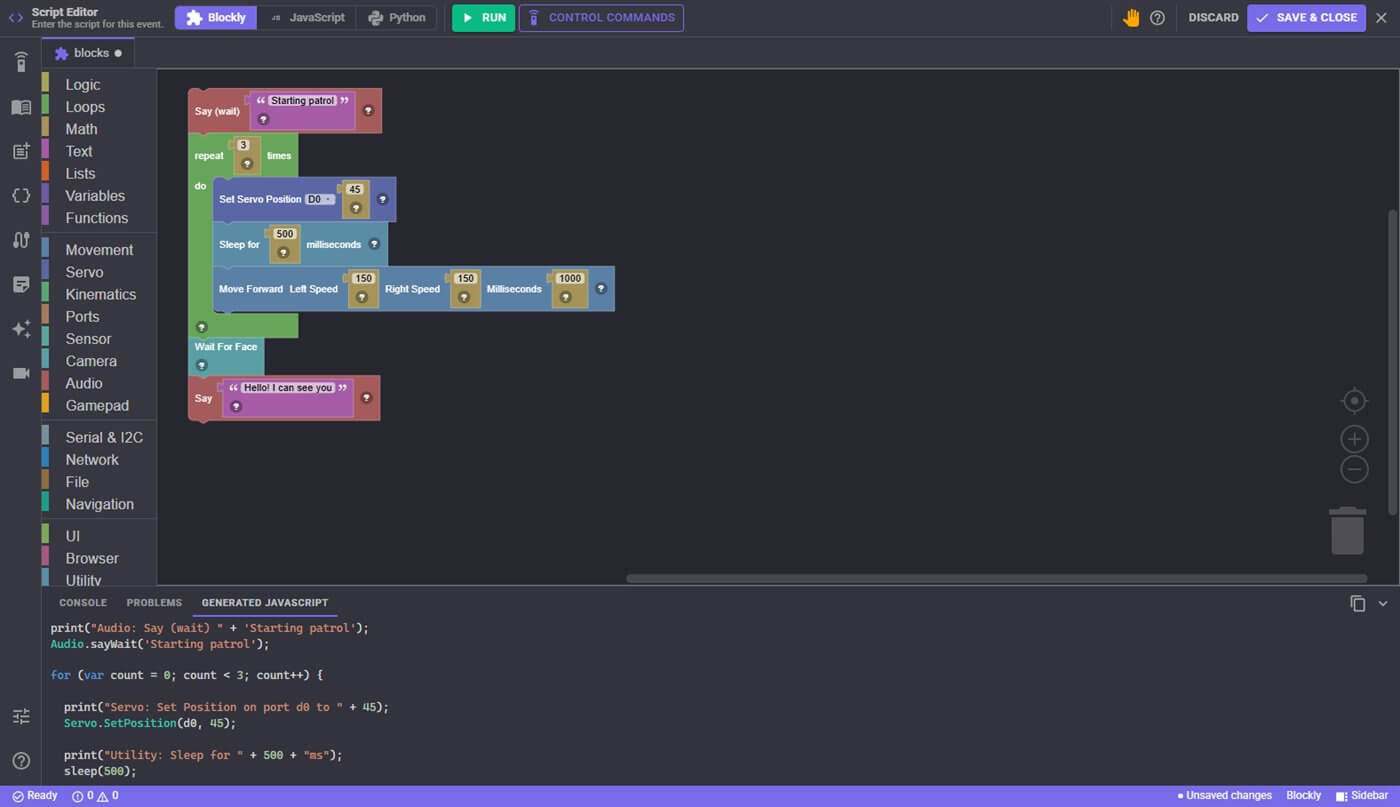
Blocks on top, the JavaScript they generate underneath.
Build robot programs with Blockly
Snap blocks together to speak, move servos, drive, wait for a face or read a sensor. Every block has a help popup, and the Generated JavaScript tab shows the code each block becomes.
- Blocks for robot control. Movement, servo, kinematics, ports, sensors, camera, audio, gamepad, serial and I2C, network, file, navigation, UI, browser windows, utility and debug.
- Blocks from your skills. Robot Skills add their own items, such as camera tracking types, sound board sounds and Auto Position actions.
- Convert to JavaScript. Convert a Blockly program to JavaScript in one click and keep editing it as text.
A script API that covers the hardware
JavaScript and Python share the same API namespaces for hardware control, audio, networking and other robot functions.
- Servo
- Movement
- Digital
- ADC
- PWM
- I2C
- UART
- COM (serial ports)
- Ping (HC-SR04)
- Audio
- Gamepad
- Kinematics
- Navigation
- Net (HTTP and UDP)
- File
- Browser
- UI
- EZB
- Log
- Console
- Utility
Servos and ports
Set and read positions, speed, velocity and acceleration, min and max limits, release servos, and read digital, ADC and PWM ports on any connected controller.
Audio and speech
Say and SayWait through the project's voice, wait for a spoken phrase, and play notes on the controller's speaker.
Gamepads
Read axes and buttons, and use rumble, the controller's LED and its gyro, for any gamepad the computer sees.
Network and files
HTTP GET and POST, UDP, and reading and writing files, so a robot can call a web service or log its own data.
User interface
Show a Custom UI screen on every connected browser, prompt the user for a choice or a number, and switch workspaces.
Utility
Global variables, sleep, wait until a time of day, random numbers, value mapping, running a program, and halting the script.
Athena AI assistant for robot programming
Athena can read your ARCx project, help write robot scripts and configure Robot Skills. Review proposed changes in the interface before approving them. Open Athena from the sparkle button on any page; the chat follows you around the app.
- Reads project details. Athena reads the skills in your project, their settings, their scripts, their control commands and your global variables.
- Review changes before applying them. Adding or removing a skill, changing a skill's settings, editing a script or sending a control command shows the proposed change first. Approve it, deny it, or approve them all.
- Configures any skill. Every Robot Skill describes its own settings, so Athena can change exactly the setting you asked about and leave the rest alone.
- Knows the skill store and the manuals. Athena searches the Robot Skill Store and the Synthiam support library to recommend skills and explain how they work.
- Robotics help from the Synthiam community. Athena draws on Synthiam forum questions and answers about building and programming robots.
- Pick a model. Choose the AI model from the chat. Athena uses AI credits from your Synthiam account, and the balance is always on screen.
 New · Model Context Protocol
Design your own control panel for the robot
Drag buttons, joysticks, sliders, gauges and camera views onto a screen, then open it on a phone, a tablet or a kiosk display to drive the robot. A project can have as many screens as you want.
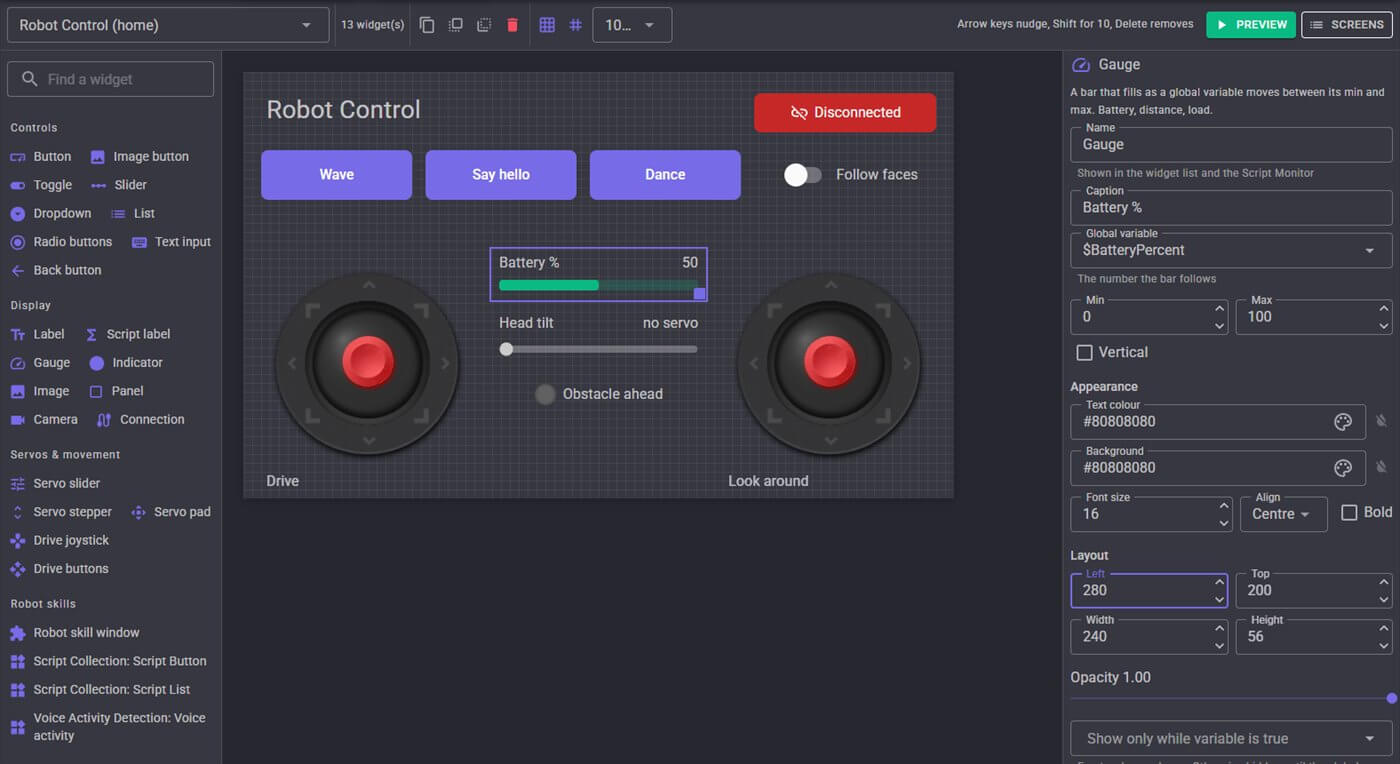
The designer: palette on the left, screen in the middle, properties on the right.
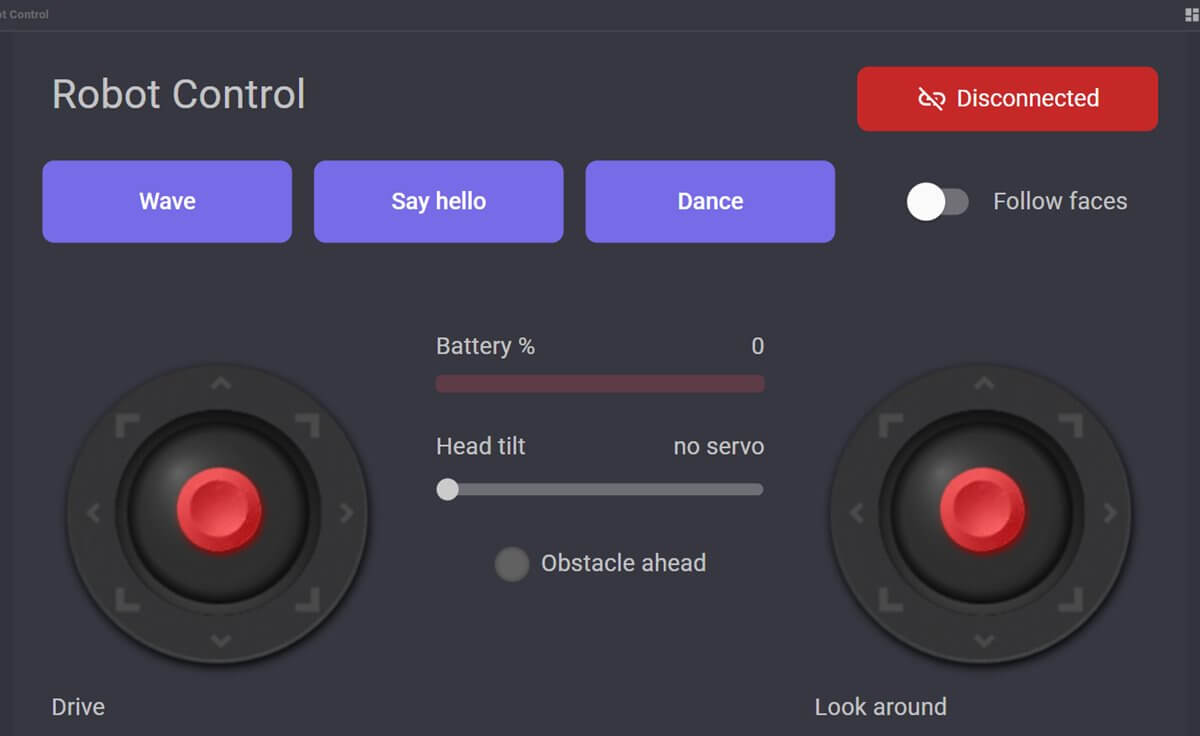
The finished control screen, scaled to fit the display.
- Screens sized for the device. Start from 800 x 480, 1280 x 720, 1920 x 1080, a phone or a tablet. The screen scales to fit, stretches, or shows at actual size.
- Layout tools. Snap grid, zoom, duplicate with Ctrl+D, arrow keys to nudge (Shift for 10), bring to front or send to back, and a live preview.
- Interactive widgets. A button can run a script, send a control command, or open another screen. Gauges, labels and indicators follow global variables live.
- Show widgets only when they matter. Any widget can be hidden until a global variable is true.
- Navigation built in. Screens link to each other, with a breadcrumb, Back, Home and full screen in the viewer toolbar.
- Opened from scripts. A script can bring every connected browser to a screen by its title, so the robot can change what its display shows.
- A kiosk lock. An optional numeric exit code keeps visitors in the viewer on a mounted tablet.
- Widgets from Robot Skills. Skills can contribute their own widgets, or you can embed a whole skill window on a screen.
- Button
- Image button
- Toggle
- Slider
- Dropdown
- List
- Radio buttons
- Text input
- Back button
- Label
- Script label
- Gauge
- Indicator
- Image
- Panel
- Camera
- Connection status
- Servo slider
- Servo stepper
- Servo pad
- Drive joystick
- Drive buttons
- Robot skill window
- Skill widgets
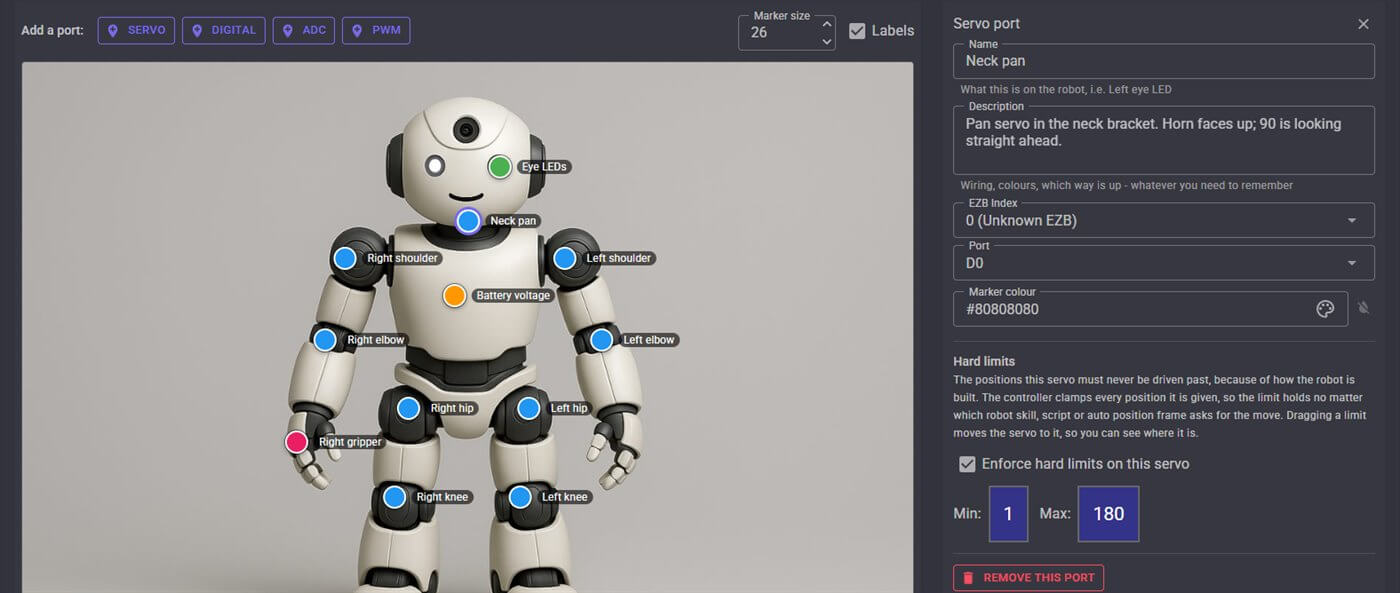
Mark each port on a picture of your robot, then name it and set its limits.
Label ports on a picture of your robot
- A picture of your robot. Upload a photo and click to place servo, digital, ADC and PWM markers where each part is.
- Port names throughout ARCx. "Left elbow" appears in every port selector in ARCx beside the port number, and the picture sits at the top of the port picker.
- Servo hard limits enforced by the controller. Set the range a servo must never pass because of how the robot is built. Every move is clamped, whether it comes from a skill, a script or an Auto Position frame, and limits are re-applied whenever a controller connects.
- Port notes saved with the project. Add a description to every port — wiring, colors, which way is up.
Robot hardware control and project management
Connect controllers, organize your Robot Skills and save backups as you work.
Multiple controllers at once
Drive several EZBs from one project, each with its own connection settings, baud rate and incoming TCP listener. Connect over USB serial or the network, or let a controller connect to ARCx.
Automatic controller discovery
The discovery service runs continuously, listening for WiFi controllers on the network and checking serial ports, and fills the address list with what it finds.
Name your ports and boards
Give a port a description — "Vertical Neck Servo" — and a board a name, so a project with three controllers and forty servos stays readable.
Servo, sensor and peripheral control
Servos (including virtual ports for smart servos), digital I/O, ADC, PWM, I2C, UART, HC-SR04 distance sensors, controller audio and streaming, music synthesis, battery voltage and board temperature.
Stop everything, fast
Release every servo and PWM port, or stop all speech, from the Tools menu in one click, wherever you are in the app.
Multiple workspaces
Organize skills across several named desktops instead of one crowded screen.
Controllers with EZB firmware
ARCx talks to boards running Synthiam's EZB protocol, including:
- EZ-B v4
- EZ-B IoTiny
- EZ-B v3
- Arduino Uno
- Arduino Mega
- Arduino Leonardo
- ESP32 DevKit
- ESP32-CAM
- Robotis OpenCM9.04
- Robotis OpenCR
- micro:bit
- Adafruit 16-channel servo shield
- UP Board
Community updates. The home page shows the newest robot skills and the latest community activity from synthiam.com, so you can follow new releases and discussions while working on your project.
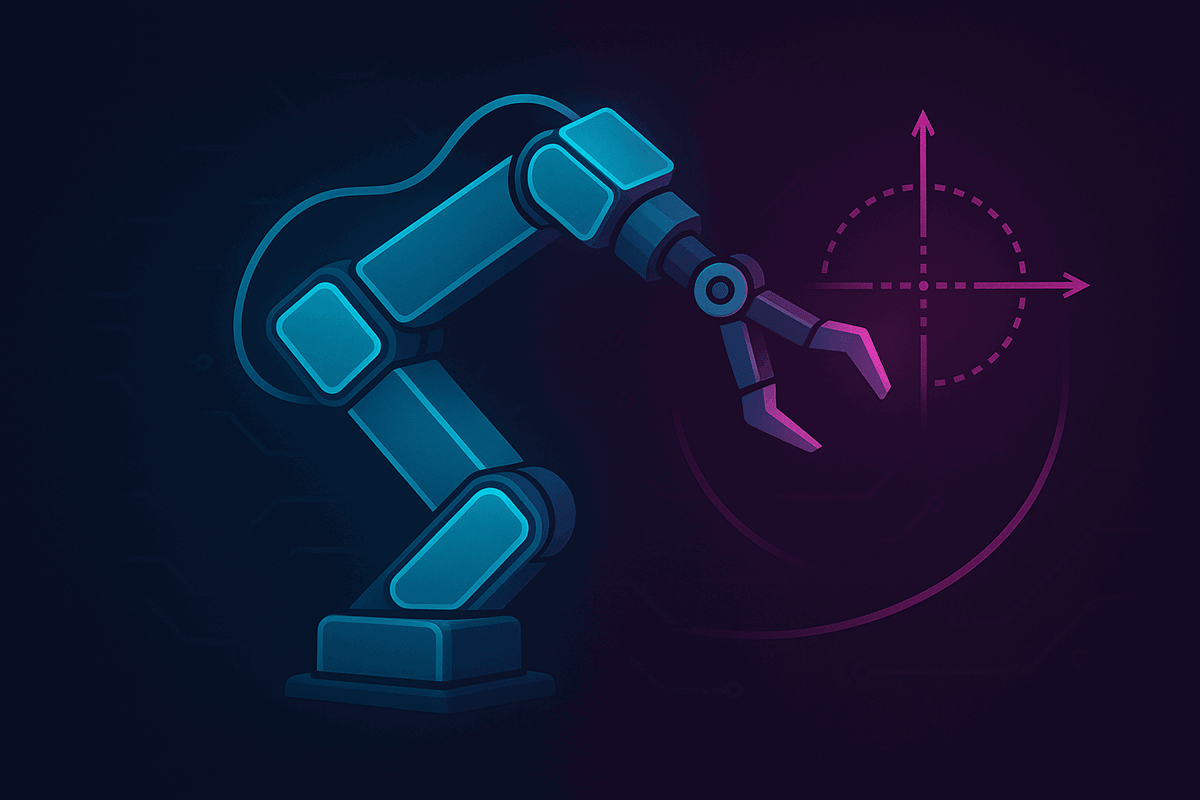
Control arms with X, Y and Z coordinates
- Smart servo drivers. Robot Skills map Robotis Dynamixel (protocol 1 and 2) and Feetech SCS, STS and SM bus servos onto virtual servo ports, so every skill and script can use them like any other servo. Position or wheel mode, synchronized writes, and live telemetry.
- Kinematic chains by name. Define an arm, a leg or a neck once, then move its end effector by X, Y and Z in millimeters. Scripts, Blockly, Custom UI, ROS and other skills all address the chain by its name.
- A kinematic chains tool. See every chain in the project with its joints and live end-effector position, and try moves from an X/Y/Z pad.
- Auto Position animation. Capture servo poses as frames, sequence them into actions such as a wave or a dance, and play them from a script, a button or the AI. The engine ramps movement in software, so servos without their own acceleration control still start and stop smoothly.
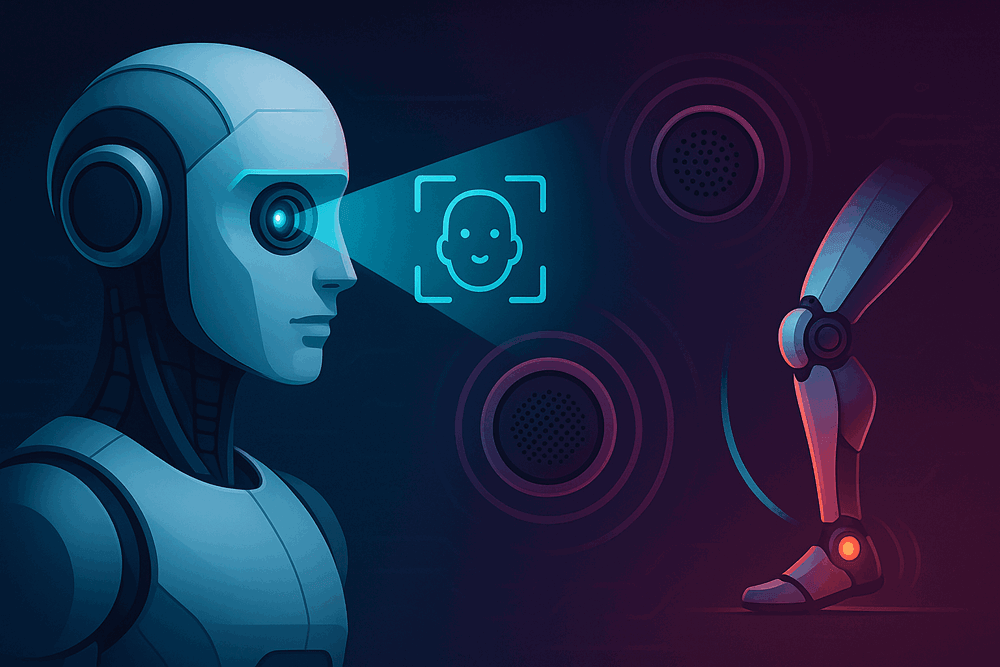
Computer vision on the robot
- OpenCV computer vision. Vision is built on OpenCV, chosen for maturity and for licensing that lets skill developers build on it too.
- USB and EZB cameras. Any camera the operating system can see (webcams, capture cards, laptop cameras) and EZB WiFi camera streams become named video sources.
- Shared video sources. Tracking, recording, snapshots and your own skills all subscribe to the same source. Detections drawn by one skill appear on the video everyone else sees.
- Face tracking. Haar cascade face detection with consecutive-frame filtering to reject false positives, and detection cost that stays constant no matter what resolution the camera captures at.
- Train your own objects. Hold an object up to the camera to teach it, then run a script whenever the robot sees it.
- Snapshots and recording. Save stills, bursts and time-lapses, or record any source to an H.264 video, with or without the detection overlays.
- A video source inspector. See every registered source with its frame rate and frame count.
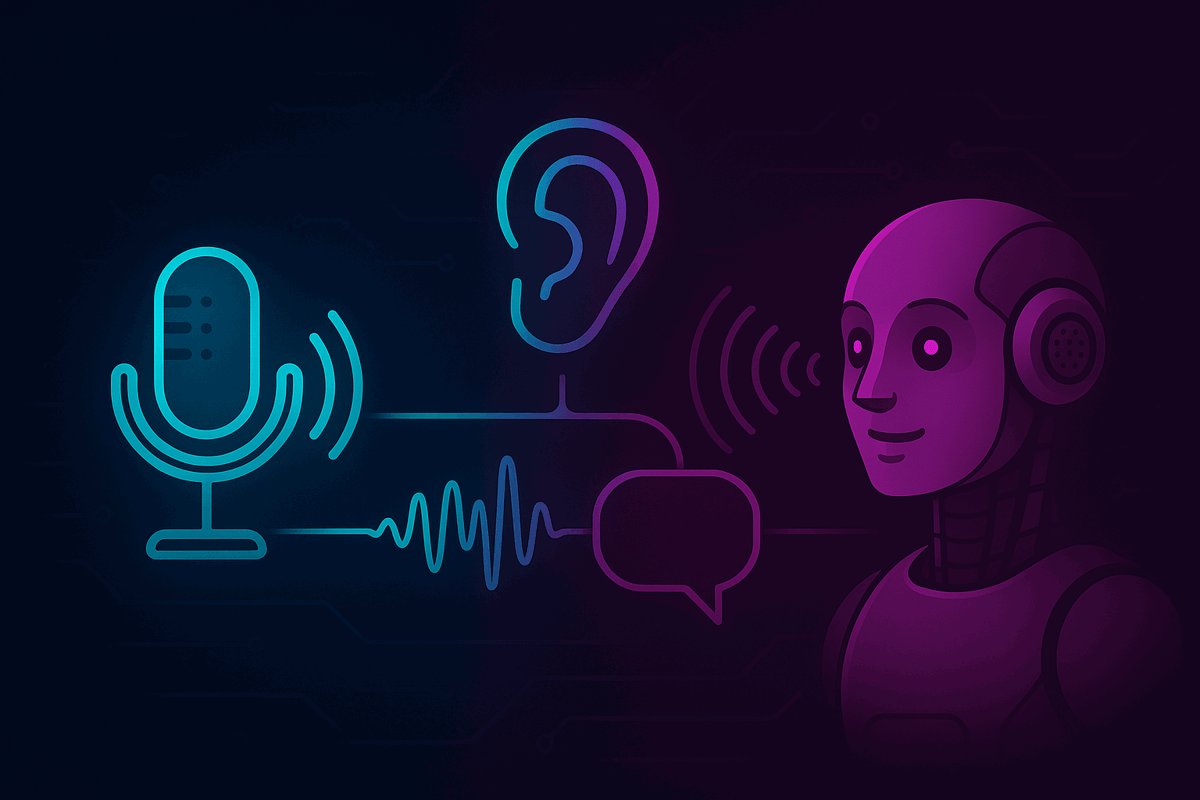
A robot that listens and talks back
- One speech framework, many engines. Pick a speech recognition engine per project. Scripts, phrase recognition and the AI all listen through it, so swapping engines changes nothing else.
- Cloud or offline recognition. Azure through your Synthiam account or your own key, offline Sherpa-ONNX neural recognition that runs on a Raspberry Pi, and the built-in Windows engine.
- Wake words. Let a free, always-listening engine wake a paid one only when it hears its name, or wake on any voice at all with voice activity detection.
- Continuous or one phrase at a time. A one-off "wait for speech" pauses a continuous listener and hands the microphone back afterwards.
- Voices. Natural Azure neural voices in many languages, a zero-setup English voice, offline Windows voices, and offline F5-TTS voice cloning from a few seconds of sample audio.
- Voice commands and reactions. Run a script when a phrase is heard, or when someone starts or stops talking. The robot ignores its own voice.
- Sound where you want it. Play through the computer's speaker or the controller's speaker, choose devices and master volume, and build a sound board with scripts that fire at exact points in a track.
One movement system for every kind of robot
Any movement panel responds to the same movement commands, so the on-screen joystick, a gamepad, a script, a speech phrase, a navigator or the AI all drive the robot the same way.
Wheels and tracks
Drive through a dual H-bridge (L298N, L293D, TB6612FNG, BTS7960 and others) with optional PWM speed control, or through two continuous rotation servos or RC speed controllers.
Walking robots
Auto Position (movement panel) binds gait actions to forward, reverse, left, right and stop, so humanoids and hexapods walk from the same controls as a wheeled robot.
More than ground robots
Movement directions include up, down, roll, take-off, land and emergency stop, with speed control, for drones and other vehicles.
Navigation messaging
Sensor skills publish lidar and distance scans, pose skills publish position, and navigator skills subscribe — so any sensor works with any navigator.
Maps and waypoints
A navigator skill builds an occupancy map with scan matching, plans a path, and drives to named waypoints such as "kitchen" around obstacles.
Panic stop
The script editor's panic button stops the script and movement, releases servos and silences audio at once, and the Tools menu releases every servo from anywhere in the app.
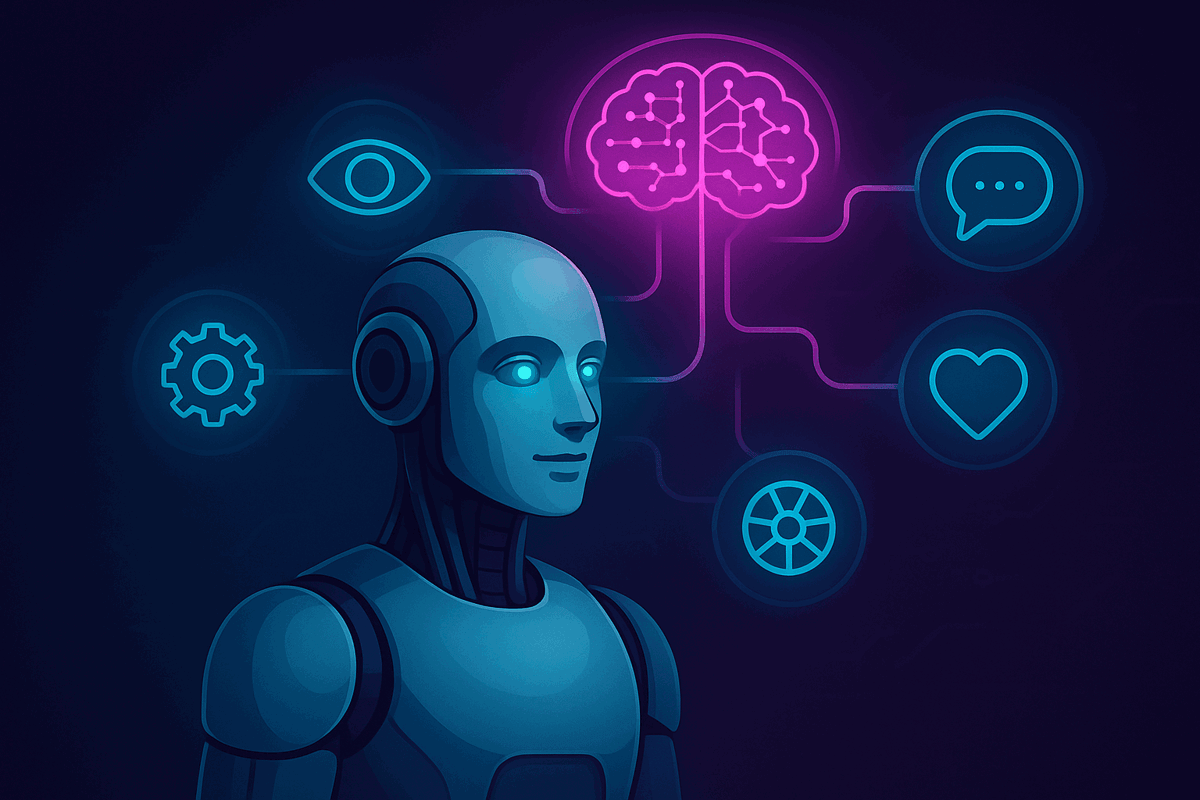
Control your robot with a language model
The Autonomous AI robot skill turns a large language model into the robot's decision maker. It sees through the camera, listens, speaks, drives, and uses the control commands of every skill in the project as tools.
- Your choice of model. OpenAI, Anthropic, Google Gemini, Groq, OpenRouter, xAI, Mistral, DeepSeek, Azure OpenAI, a custom endpoint, or a local model through Ollama or LM Studio.
- Behavior and limits. Personality, drives, mood, memory and goals shape what it does, and safety limits bound what it is allowed to do.
- Tools from Robot Skills. Because every skill exposes control commands, a new skill you add is a new tool the AI can use.
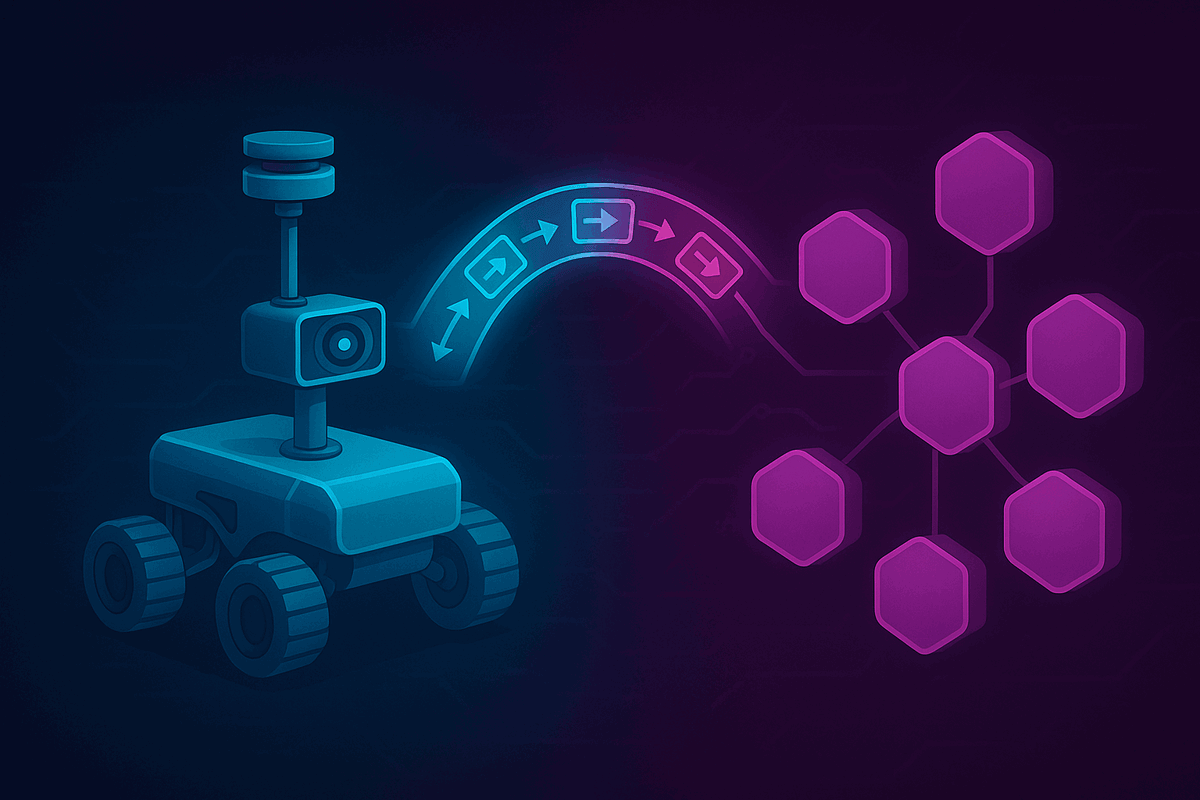
Connect ARCx to ROS 2
The ROS 2 Connector robot skill bridges ARCx and ROS 2 through rosbridge over a WebSocket. ROS does not need to be installed on the ARCx computer.
- Movement. The movement panel and
/cmd_velTwist messages drive each other. - Servos, sensors and ports. Servos as JointState, lidar and pose as LaserScan and Odometry, digital, ADC and PWM ports, and battery state.
- Cameras. ARCx video sources publish as compressed images.
- Anything else. Map global variables to any topic, advertise services, use custom JSON message templates, or drive the bridge from scripts.
Gamepads, displays and the robot's own screen
Drive with the controller you already own, and put a face on the robot.
Any gamepad
Xbox, PlayStation, Switch, 8BitDo, Logitech, Steam, flight sticks and wheels, over USB or Bluetooth. Single stick, tank or racing-trigger driving, servo aiming and scripts on buttons, plus rumble, the controller's LED and its gyro.
Wii Remote and on-screen joysticks
Drive with a Wii Remote's D-pad and tilt it to move servos, or use the touch joystick in any browser. A Gamepads and HID page shows every connected device live.
Browser windows on the robot's monitor
Open web pages, dashboards, video calls or a robot face on displays attached to the robot's computer — windowed, full screen or kiosk, on the monitor you choose. Pages and scripts can message each other.
RGB eyes
Build color animations for the EZ-Robot I2C RGB eyes and trigger them from scripts, the AI or the sound board.
Sound board timelines
Import WAV and MP3 files into the project and fire scripts at exact points in the audio to animate the robot to a soundtrack.
Record and play back
Record clips from the computer's microphone into the project and play them from the controller's speaker with a button or a control command.
Projects, files and preferences
Save, organize, share and restore your robot projects.
Project search and automatic backups
Organize projects with tags and browse them as cards or a list. Enable timestamped backups on each save to keep earlier versions you can restore.
Save to your Synthiam cloud
Save a project to your Synthiam account with a description of what changed, tags, and a public or private setting, then open it on another robot.
Merge projects
Bring selected skills from another project into the one that is open, instead of rebuilding them by hand.
Project properties
Add a project picture, description, tags, video and manual link. Store project notes and port descriptions, select the speech engine for scripts, and configure the startup script and its delay.
File manager in the browser
Browse the robot's ARCx data folder from your browser. Upload, download or delete files, create folders, and view files as text, hexadecimal data or images.
Preferences per computer
Default script language, editor and log font sizes, theme, audio output and devices, default skills for new projects, controller discovery, automatic skill updates, vision image size and more — saved as you change them.
Update notices and release notes
ARCx checks for new versions on its own schedule, shows a badge when one is out, and lists the release notes on the About page with a download link.

A guided first run
The welcome tour explains how ARCx works, sets your theme, your default script language and whether a browser opens at start, and introduces Athena.

Help and manuals
Every skill window links to its manual, the Help page links to the Synthiam support library and community, and a project can offer its own manual when it opens.
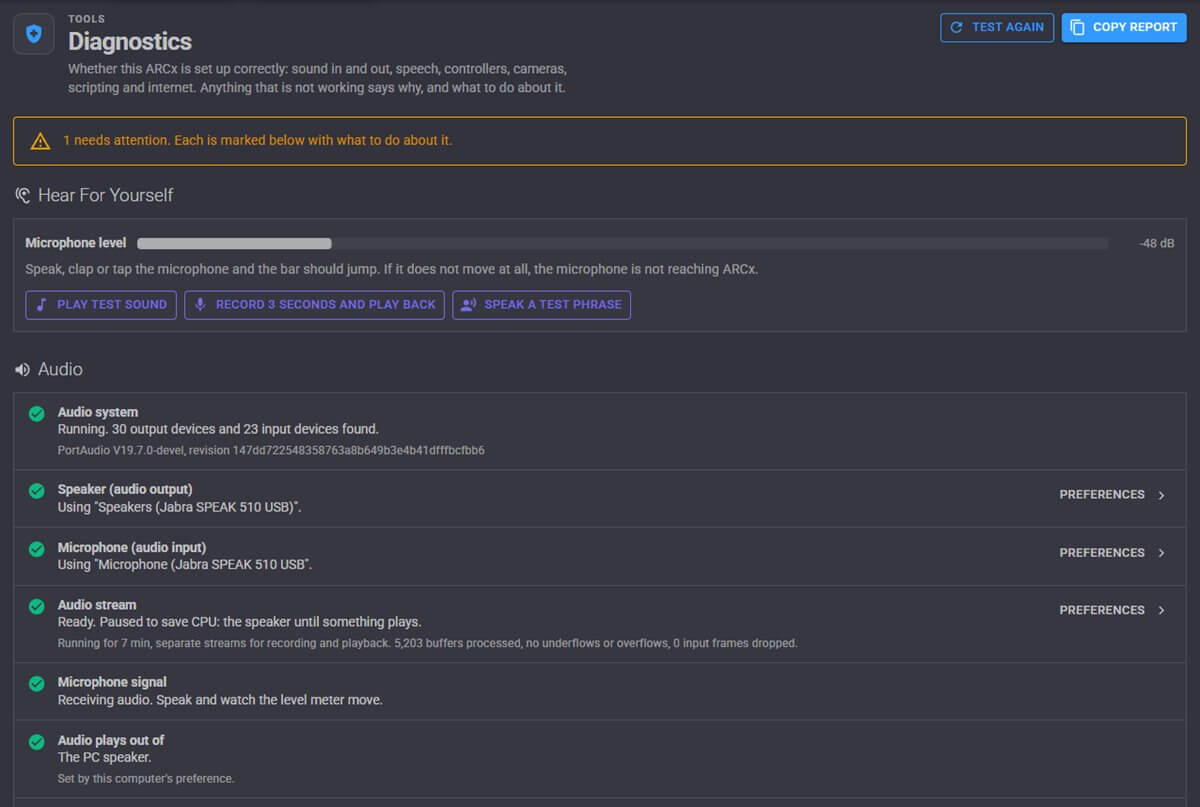
Diagnostics checks your setup and suggests steps to resolve detected problems.
Robot debugging tools
- System health checks. Audio, speaker, microphone, speech engines, controller discovery, gamepads, displays, cameras, scripts, the project, skill errors, the web server, the internet, your account, memory and the data folder.
- Audio tests. Check microphone levels, play a test sound, record and play back a three-second clip, or try a spoken test phrase.
- Copy a report. One click copies the full report for a support post.
- Error notifications. Warnings and errors appear in a popup with a link to details in the debug log.
- Monitors. A skills log, script monitor, serial port monitor, file monitor, network info with the address to browse to, and a video source inspector.
Create your own Robot Skills
The Create Robot Skill tool registers your skill with Synthiam and generates a project with a worker, interface, configuration screen and optional Custom UI widget. The generated project is configured to work with the Robot Skill Store and your local ARCx installation.
- Built for AI coding assistants. ARCx writes a ready-made prompt for Claude Code, Codex, Cursor or Copilot that tells the assistant where the project is, which manuals to read and how to build it.
- Developer documentation. ARCx includes guides for getting started, core services and UI components, plus a detailed developer manual in every new project.
- Install on build. Each build installs the skill into ARCx, ready to add to a project.
- Publish from the app. Upload a new version with release notes, and ARCx generates the control command manual for the skill's store page.
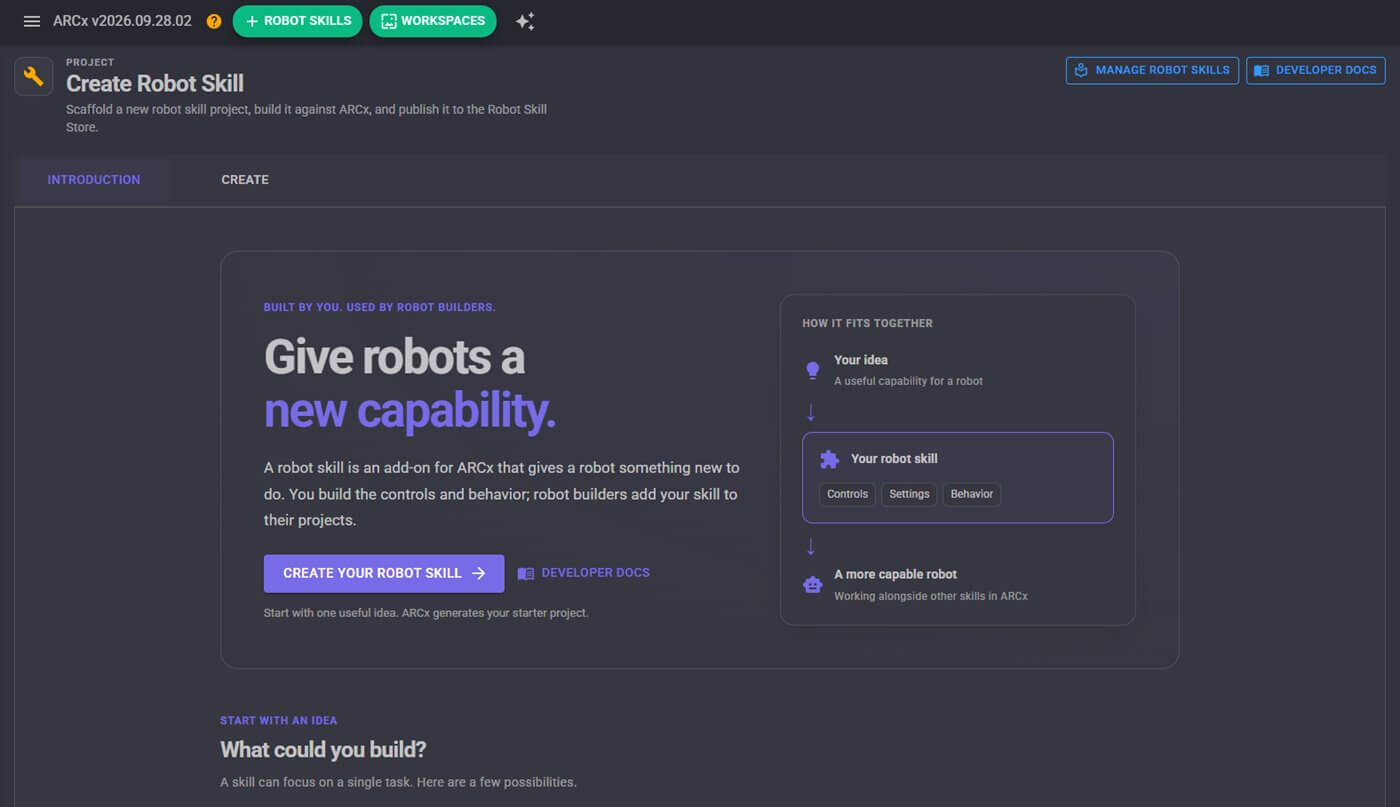
What your skill can provide
- Control commands that scripts, Athena, the AI and other skills can call.
- A settings description that Athena reads, so it can configure your skill for users.
- Custom UI widgets and Blockly items of its own.
- Services for video, movement, kinematics, audio, speech, scripting and logging, plus ready-made interface parts such as servo and port pickers, video views, joysticks and a drawing canvas.
- New engines. A skill can become the project's voice, its speech recognition engine or its movement panel.
Robot Skills available for ARCx
Skills from the Robot Skill Store that run in ARCx today. Unless noted, each runs on Windows, Linux and Raspberry Pi.
🎥 Camera 31
| Auto Dock By Camera Glyph | Camera-guided docking to a printed glyph with charging confirmation, undocking, retries, and Movement Manager support |
|---|---|
| Camera Nms Pose | Camera-based robot pose tracking for ARCx with perspective calibration, floor mapping, and NMS navigation without encoders, lidar, or SLAM. |
| Camera Snapshot | Save JPEG or PNG snapshots from any running camera source on demand, in bursts, or on a timer for time-lapse capture. |
| Camera Source (ezb) | Publishes an EZB camera as an ARCx video source for tracking, recording, and AI skills over the network, with processed or raw view. |
| Camera Source (usb) | Publishes a camera feed as a named ARCx video source for face tracking, object tracking, recording, and autonomous AI. |
| Chat Gpt | OpenAI/Gemini/Groq chatbot for robots with memory, vision, speech, and JavaScript actions via OpenAI API-compatible models |
| Cognitive Emotion | Analyzes camera images for eight emotions, logs scores, triggers scripts, and can speak or auto-detect mood changes. |
| Cognitive Vision | Cloud vision for scene descriptions, OCR, object boxes, tags, adult/racy scores, scripts, auto mode, and MCP tools for ARCx |
| Color Tracking | Detects taught colors in camera video, reporting position, size, shape, rotation and distance with per-color scripts and tracking support. |
| Dji Tello Movement Panel | Control DJI/Ryze Tello drones from ARCx with live video, telemetry, mission pads, movement scripts, HUD, and AI tools. |
| Face Tracking | Detects faces in camera video, marks them, and tracks the largest face for servo tracking and presence detection |
| Glyph Recognition | Detect printed glyphs, identify rotation, distance and position, and trigger scripts for each marker in view. |
| Hugging Face | AI robot skill with Hugging Face chat, vision, object finding, watching, and Whisper speech recognition for ARCx |
| Intel Realsense | Intel RealSense depth camera skill for ARCx navigation, video, measured detections, tilt sensing, recordings, and point clouds. |
| Intel Realsense Tracking | Tracks robot position and heading with Intel RealSense cameras, sending data to ARCx navigation, scripts, variables, video, and maps. |
| Kinect Body Control | Turn your body into a robot controller with Kinect or any camera, tracking gestures, joints, scripts, and servo mappings in 3D. |
| Kinect Xbox 360 Depth Mapping | Uses Kinect v1 as a depth sensor for obstacle scans, floor-drop detection, vision range measurement, tilt/LED control, and simulated testing across platforms. |
| Mebo Movement Panel | ARCx control for Mebo 2 WiFi robot: drive wheels, move arm/claw, stream camera, lights, battery, speak, and use AI tools-no cloud needed |
| Object Training And Tracking | Train textured objects from camera or images, detect them in video, run scripts, publish position, and draw bounding boxes. |
| Opencv Filter Flow | Build custom OpenCV pipelines to detect colors, shapes, edges, and contours with live step-by-step tuning in ARCx. |
| Orbbec Depth Camera | Orbbec 3D camera skill for ARCx: obstacle scans, video, depth, IMU tilt, detections distance, recordings, point clouds, multi-camera support |
| Orbbec Depth Camera V1 | Orbbec legacy camera support for ARCx: obstacle scans, floor-drop detection, depth/color/IR video, measurements, recording, clouds, multi-camera support |
| Stereolabs Zed Camera | Turns a Stereolabs ZED camera into GPU-free depth, obstacle scans, video, IMU and AI-ready 3D sensing for ARC on Windows, Linux and macOS. |
| Structure Sensor | Structure Sensor depth, obstacle scanning, 3D scanning, recording, playback, and paired-color vision for robots via OpenNI2 |
| Video File Source | Plays video files as a virtual camera in ARCx for vision skills, with playlists, repeat modes, embedded files, and scripting support |
| Video Overlay | Real-time video compositor for camera overlays, text, graphics, effects, meters, templates, and scripted transitions. |
| Video Recorder | Records raw or processed camera video to .mkv files with overlays, for demos, evidence, and reviewing tracking behavior. |
| Video Stream Source | Play RTSP, MJPEG, snapshots, HLS, video files and web streams as an ARCx camera for vision skills, with auto reconnect and web page resolution. |
| Vision Detection Tracking Script | Tracks detections from one camera to drive servos, movement, scripts, variables, and commands for faces, glyphs, objects, and colors. |
| Visual Waypoint Navigation | Teach-and-repeat navigation with one camera: train waypoints and routes, then drive to places by visual matching. |
| Zivid 3d Camera | Zivid 3D camera skill for ARCx: captures aligned color/depth snapshots, detects pick points, measures objects, exports clouds, and drives arm picks. |
⚙ Servo 29
| Auto Position | Animate servo groups with frames and actions for waves, nods, gestures, and other robot motions. |
|---|---|
| Auto Position (movement Panel) | Animate servo poses into actions for walking, waving, standing or sitting; supports joystick movement and gait control for humanoids/hexapods. |
| Custom Servo Controller | Turns an Arduino into an ARCx servo controller with virtual-port mapping, speed, release, sync, and position reads. |
| Dynamixel Servo Driver | Drive Dynamixel smart servos from ARCx virtual ports over an EZB serial bus with sync writes, scans, telemetry, and mode control. |
| Feetech Bus Servo Driver | Drives Feetech SCS TTL serial bus servos from ARC virtual ports over EZB UART, digital port, or USB COM adapter. |
| Feetech Rs485 Servo Driver | Drives Feetech SM, STS, and SCS bus servos from ARCx virtual servo ports via EZB or COM port, with sync writes and telemetry. |
| Front Wheel Steering | Front-wheel steering car movement panel for RC cars, rovers and toy conversions with servo, ESC, motor and odometry support |
| Key Control | Browser-based keyboard robot control with remappable keys for driving, servo control, speed changes, scripts, and safe deadman stopping. |
| Kinect Body Control | Turn your body into a robot controller with Kinect or any camera, tracking gestures, joints, scripts, and servo mappings in 3D. |
| Kinematics Service | Publish robot arms as named kinematic chains and move tools by millimetre coordinates with inverse kinematics, linear moves, and saved poses. |
| Lewansoul Servo Driver | Control LewanSoul/Hiwonder bus servos from ARCx virtual ports with UART, digital port, or BusLinker support and telemetry. |
| Lynxmotion Smart Servo Driver | Controls Lynxmotion LSS/LSS-PRO smart servos from ARC virtual ports with UART, digital, or USB serial bus support. |
| Maestro Servo Controller | Maps ARCx virtual servo ports to Pololu Maestro channels for servo control, with per-channel pulse, speed, accel, invert, and readback. |
| Mebo Movement Panel | ARCx control for Mebo 2 WiFi robot: drive wheels, move arm/claw, stream camera, lights, battery, speak, and use AI tools-no cloud needed |
| Meta Quest Robot | Meta Quest teleoperation for ARCx: stereo video, head-tracked neck, 3D arm control, hand/finger tracking, driving, buttons, safety, haptics |
| Midi Control | Turns MIDI controllers into robot controls for servos, movement, variables, scripts, lighting, and synth output with layers and feedback |
| Pca9685 Servo Driver | Drives up to 16 servos per PCA9685 over I2C from ARC virtual ports with per-channel mapping, ramping, trim, and calibration. |
| Ping Radar Scan | Sweeping ultrasonic radar with live display, obstacle avoidance, clearest-direction tracking, NMS output, and scriptable obstacle zones |
| Sabertooth Kangaroo Servo | Controls Kangaroo x2/Sabertooth motor axes as ARCx virtual servos with homing, limit switches, stalls, readback, and smooth motion. |
| Servo | Manual servo slider with center and release controls; follows external moves and respects safe position limits for one joint. |
| Servo Animation | Record, edit, and loop servo motions with script points and audio tracks for precise robot playback and choreography |
| Servo Pad | Puppeteer servos with a touch pad; smooth, record, loop, save poses, and control pan/tilt, eyes, necks, or shoulders. |
| Servo Sketch 3d | 3D drawing for servos or robot arms: live trail, sketch pad, shapes, SVG import, recording, playback, and AI-assisted control |
| Ssc32 Servo Controller | Drives up to 32 servos on Lynxmotion SSC-32/SSC-32U from ARCx virtual ports with flexible mapping, speed, and pulse control |
| Stepper Servo | Turns stepper motors into ARCx servos with homing, position reads, speed control, and support for up to 127 motors across Arduino buses |
| Talk Servo | Moves mouth or jaw servos to sync with TTS speech, using audio level or text timing for lifelike talking heads. |
| Touch Display Designer | Design touch-screen robot control panels with buttons, sliders, gauges, joysticks, live variables, scripts, and Wi-Fi/USB display support. |
| Viam Robot Controller | Connects ARCx to Viam viam-server, auto-mapping robot resources to movement, servos, cameras, sensors, and Robot Bus data. |
| Webots Simulator | ARCx interface for Webots robots: drive, control joints, vision, lidar mapping, sensors, and move projects to real robots. |
🔗 Navigation 22
| Another Navigator | Sensor-based SLAM navigation: builds maps, plans routes to waypoints, and drives using positioning, distance, and movement skills. |
|---|---|
| Auto Dock By Camera Glyph | Camera-guided docking to a printed glyph with charging confirmation, undocking, retries, and Movement Manager support |
| Bn880 Gps Compass | BN-880 GPS/compass fusion for ARCx: smooth robot pose, heading, and earth-mapped coordinates for outdoor navigation |
| Camera Nms Pose | Camera-based robot pose tracking for ARCx with perspective calibration, floor mapping, and NMS navigation without encoders, lidar, or SLAM. |
| Hitachi Lg Lds Lidar | USB lidar skill for Hitachi-LG LDS-01: scans to NMS, globals, obstacle zones, and live view for navigation. |
| Intel Realsense | Intel RealSense depth camera skill for ARCx navigation, video, measured detections, tilt sensing, recordings, and point clouds. |
| Intel Realsense Tracking | Tracks robot position and heading with Intel RealSense cameras, sending data to ARCx navigation, scripts, variables, video, and maps. |
| Kinect Xbox 360 Depth Mapping | Uses Kinect v1 as a depth sensor for obstacle scans, floor-drop detection, vision range measurement, tilt/LED control, and simulated testing across platforms. |
| Mavlink Autopilot | ARCx MAVLink autopilot control for Pixhawk/PX4/ArduPilot: drive, nav, obstacle avoidance, geofence, and mowing planner with simulation. |
| Mpu6050 Imu | Reads an MPU6050 IMU on EZB, calculates orientation, shows 3D/horizon/graphs, publishes variables, and triggers tilt/shock/fall alarms |
| Nms Navigation Data Grabber | Queries NMS scan data for nearest obstacles, clear paths, open directions, zones, and pose without driving or mapping. |
| Orbbec Depth Camera | Orbbec 3D camera skill for ARCx: obstacle scans, video, depth, IMU tilt, detections distance, recordings, point clouds, multi-camera support |
| Orbbec Depth Camera V1 | Orbbec legacy camera support for ARCx: obstacle scans, floor-drop detection, depth/color/IR video, measurements, recording, clouds, multi-camera support |
| Outdoor Navigator | GPS-driven outdoor robot navigation with satellite maps, saved waypoints, zones, no-go areas, obstacle avoidance, and coverage mowing patterns |
| Ping Radar Scan | Sweeping ultrasonic radar with live display, obstacle avoidance, clearest-direction tracking, NMS output, and scriptable obstacle zones |
| Ping Sensor | HC-SR04 ultrasonic distance sensor skill with filtering, alarms, obstacle guard, navigation support, and shared distance variables |
| Rplidar | Slamtec RPLidar scanner integration for NMS, global variables, obstacle zones, and live scan view across USB, UART, or network. |
| Rtk Gps | RTK GPS rover/base skill with NTRIP corrections, cm-level pose, heading support, map fusion, and NMS publishing for ARCx |
| Stereolabs Zed Camera | Turns a Stereolabs ZED camera into GPU-free depth, obstacle scans, video, IMU and AI-ready 3D sensing for ARC on Windows, Linux and macOS. |
| Structure Sensor | Structure Sensor depth, obstacle scanning, 3D scanning, recording, playback, and paired-color vision for robots via OpenNI2 |
| Visual Waypoint Navigation | Teach-and-repeat navigation with one camera: train waypoints and routes, then drive to places by visual matching. |
| Zivid 3d Camera | Zivid 3D camera skill for ARCx: captures aligned color/depth snapshots, detects pick points, measures objects, exports clouds, and drives arm picks. |
🎤 Audio 20
| Advanced Speech Synthesis | Azure neural text-to-speech for ARCx scripts and skills, with multilingual voices, SSML support, and EZB audio output. |
|---|---|
| Aimlbot | Offline AIML chatbot for ARCx with built-in editor, memory, speech, scripts, quick replies, and robot control commands |
| Amazon Alexa | Control Alexa devices from ARC: speak, announce, run routines, ask questions, play media, and trigger robot scripts from voice history. |
| Azure Speech To Text Engine | Azure-powered speech recognition via Synthiam account, with wake word support, phrase capture, and ARCx scripting/custom UI integration. |
| Azure Speech To Text Engine (Custom) | Azure-powered multilingual speech-to-text for ARCx with language detection, wake words, phrase recognition, and script listening. |
| Basic Speech Synthesis | English-only cloud TTS for ARCx using classic Windows voices; speaks project audio on PC or EZB speaker with one-login setup |
| Conversational Menu | Voice-driven nested menus for robots: ask questions, listen for choices, run scripts, and support clickable or tap-to-select options. |
| Frequency Detector | Listens to microphone pitch, publishes frequency and note, moves servos, and triggers scripts from detected sound bands |
| Hugging Face | AI robot skill with Hugging Face chat, vision, object finding, watching, and Whisper speech recognition for ARCx |
| Microphone Playback (ezb) | Records microphone audio into named slots and plays it through an EZB speaker, with recordings stored in the project. |
| Midi Control | Turns MIDI controllers into robot controls for servos, movement, variables, scripts, lighting, and synth output with layers and feedback |
| Onnx Text To Speech Voice Cloner | Offline F5-TTS voice cloning for ARCx: train voices, speak replies instantly, and save MP3/WAV with no cloud or per-sentence cost |
| Openai Whisper | Speech-to-text with Whisper for ARC: transcribes phrases in many languages via OpenAI, Groq, or local OpenAI-compatible servers. |
| Sherpa-Onnx Speech To Text | Offline speech-to-text engine for ARCx using sherpa-onnx models; runs locally on Windows, Linux, Raspberry Pi, and Mac with no internet after download |
| Sound Board | Import WAV/MP3 audio, store it in the project, and trigger robot scripts at exact timeline markers for synced sound and motion. |
| Speech Phrase Recognition | Voice command phrase recognition that triggers scripts via your project’s speech-to-text engine, with confidence filtering and wake-word support. |
| Talk Servo | Moves mouth or jaw servos to sync with TTS speech, using audio level or text timing for lifelike talking heads. |
| Vader Sentiment Analysis | Offline English sentiment analysis with mood tracking, speech/chat scoring, scripts, variables, and AI tools for ARCx robots |
| Voice Activity Detection | Detects human speech from microphone energy, ignoring noise and robot speech, to trigger scripts or wake speech recognition. |
| Windows Speech Engine | Local Windows text-to-speech and speech recognition for ARCx: speak, listen, wake-word detect, and run offline without internet or accounts. Windows only. |
🚗 Movement Panels 16
| Auto Position (movement Panel) | Animate servo poses into actions for walking, waving, standing or sitting; supports joystick movement and gait control for humanoids/hexapods. |
|---|---|
| Brushless Motor Movement Panel | Controls two BLDC motor controllers for ARC movement, with ramping, brakes, wiring test, safety stops, and multi-EZB support. |
| Continuous Rotation Movement Panel | Movement panel for two continuous rotation servos or ESCs, controlling robot drive from ARC movement skills, scripts, Wiimote, and ROS cmd_vel. |
| Custom Movement Panel | Script-driven movement panel for any robot, drone, or API, with custom directions, speed control, and safety stops |
| Dji Tello Movement Panel | Control DJI/Ryze Tello drones from ARCx with live video, telemetry, mission pads, movement scripts, HUD, and AI tools. |
| Front Wheel Steering | Front-wheel steering car movement panel for RC cars, rovers and toy conversions with servo, ESC, motor and odometry support |
| Hbridge Movement Panel | Movement panel for dual H-bridge motor controllers, driving two motors with optional PWM speed control in ARCx. |
| Irobot Roomba Movement Panel | Movement panel for iRobot robots: drive, read sensors, track position, run scripts, play tunes, and connect via serial, Wi-Fi, or ROS 2 |
| Mavlink Autopilot | ARCx MAVLink autopilot control for Pixhawk/PX4/ArduPilot: drive, nav, obstacle avoidance, geofence, and mowing planner with simulation. |
| Mebo Movement Panel | ARCx control for Mebo 2 WiFi robot: drive wheels, move arm/claw, stream camera, lights, battery, speak, and use AI tools-no cloud needed |
| Ohmnilabs Telepresence | Control an OhmniLabs telepresence robot from ARCx: wheels, neck, battery, light ring, odometry, docking, and navigation support. |
| Sabertooth Kangaroo | Tank-drive movement panel for Kangaroo x2/Sabertooth with encoder odometry, NMS position, and measured drive/turn commands. |
| Sabertooth Movement Panel | Controls a robot with a Dimension Engineering Sabertooth motor driver, supporting tank steering, ramping, telemetry, failsafes, and multiple protocols |
| Two Wheel Self Balancing Robot | Segway-style self-balancing robot control with live tuning, auto-tune, EEPROM saving, and ARCx drive/status support for Arduino or ESP32. |
| Viam Robot Controller | Connects ARCx to Viam viam-server, auto-mapping robot resources to movement, servos, cameras, sensors, and Robot Bus data. |
| Webots Simulator | ARCx interface for Webots robots: drive, control joints, vision, lidar mapping, sensors, and move projects to real robots. |
🎮 Remote Control 13
| Amazon Alexa | Control Alexa devices from ARC: speak, announce, run routines, ask questions, play media, and trigger robot scripts from voice history. |
|---|---|
| Dji Tello Movement Panel | Control DJI/Ryze Tello drones from ARCx with live video, telemetry, mission pads, movement scripts, HUD, and AI tools. |
| Exosphere | Remote robot control and telepresence from any browser, with video, audio, servos, scripts, and access-list permissions. |
| Joystick | Cross-platform controller skill for driving robots, steering servos, flying drones, and running scripts with USB or Bluetooth gamepads/joysticks. |
| Key Control | Browser-based keyboard robot control with remappable keys for driving, servo control, speed changes, scripts, and safe deadman stopping. |
| Kinect Body Control | Turn your body into a robot controller with Kinect or any camera, tracking gestures, joints, scripts, and servo mappings in 3D. |
| Meta Quest Robot | Meta Quest teleoperation for ARCx: stereo video, head-tracked neck, 3D arm control, hand/finger tracking, driving, buttons, safety, haptics |
| Midi Control | Turns MIDI controllers into robot controls for servos, movement, variables, scripts, lighting, and synth output with layers and feedback |
| Movement Joystick | On-screen joystick for driving any ARC movement panel with mouse or touch; speed scales with drag distance and can stop on release. |
| Mqtt Broker | MQTT broker for ARCx with robot bridge, topics, triggers, retained messages, TLS/WebSockets, security, and scripting control |
| Mqtt Client | MQTT client for ARCx: connect to brokers, subscribe/publish topics, bridge robot data to Home Assistant, and enable remote control. |
| Touch Display Designer | Design touch-screen robot control panels with buttons, sliders, gauges, joysticks, live variables, scripts, and Wi-Fi/USB display support. |
| Wiimote | Control robots with a Wii Remote: D-Pad drives movement, buttons run scripts, and tilt can position servos. Windows, Linux, and macOS support. |
📝 Scripting 13
| Custom Movement Panel | Script-driven movement panel for any robot, drone, or API, with custom directions, speed control, and safety stops |
|---|---|
| Ez Chart | Live robot data charts with alarms, markers, hover stats, CSV/PNG export, and 10 chart types for variables, sensors, scripts, and more |
| Industrial Plc Controller | Connect ARCx to Modbus, OPC UA, EtherNet/IP or Siemens S7 PLCs with shared tags, events, scripts, UI widgets and simulator support |
| Key Control | Browser-based keyboard robot control with remappable keys for driving, servo control, speed changes, scripts, and safe deadman stopping. |
| Movement Script | Runs scripts on robot direction changes for lights, sounds, logs and actions without driving the motors |
| Mqtt Broker | MQTT broker for ARCx with robot bridge, topics, triggers, retained messages, TLS/WebSockets, security, and scripting control |
| Mqtt Client | MQTT client for ARCx: connect to brokers, subscribe/publish topics, bridge robot data to Home Assistant, and enable remote control. |
| Opencv Filter Flow | Build custom OpenCV pipelines to detect colors, shapes, edges, and contours with live step-by-step tuning in ARCx. |
| Python Native | Runs real CPython in ARCx with VS Code-style editor, pip packages, ARCx API access, and bidirectional ControlCommand integration |
| Script | Run JavaScript or Python scripts in ARCx to automate sequences, react to events, and control other skills via commands. |
| Script Collection | Manage multiple independent scripts in one robot skill window with grouped controls, shared logs, and control commands. |
| Script Scheduler | Flexible script scheduler for timed, solar, cron, and one-time runs with conditions, history, and parallel execution |
| Terminal | Serial terminal for ARC and EZ-B UARTs with macros, triggers, scripts, logs, and AI tools for serial devices |
🔗 Communication 10
| Amazon Alexa | Control Alexa devices from ARC: speak, announce, run routines, ask questions, play media, and trigger robot scripts from voice history. |
|---|---|
| Ezb Connection | Connects ARCx to EZ-B boards over serial, network, or TCP listener, with multi-board control, connection scripts, and project audio routing |
| Industrial Plc Controller | Connect ARCx to Modbus, OPC UA, EtherNet/IP or Siemens S7 PLCs with shared tags, events, scripts, UI widgets and simulator support |
| Mqtt Broker | MQTT broker for ARCx with robot bridge, topics, triggers, retained messages, TLS/WebSockets, security, and scripting control |
| Mqtt Client | MQTT client for ARCx: connect to brokers, subscribe/publish topics, bridge robot data to Home Assistant, and enable remote control. |
| Pushover | Send Pushover push alerts from your robot to phone, smartwatch or desktop with images, priorities, emergencies, and variable alerts. |
| ROS 2 Connector | Bridge ARCx and ROS 2 via rosbridge: bind topics, publish Robot Bus data, and expose ARCx services without ROS installed. |
| Terminal | Serial terminal for ARC and EZ-B UARTs with macros, triggers, scripts, logs, and AI tools for serial devices |
| Viam Robot Controller | Connects ARCx to Viam viam-server, auto-mapping robot resources to movement, servos, cameras, sensors, and Robot Bus data. |
| Webots Simulator | ARCx interface for Webots robots: drive, control joints, vision, lidar mapping, sensors, and move projects to real robots. |
🤖 Artificial Intelligence 8
| Aimlbot | Offline AIML chatbot for ARCx with built-in editor, memory, speech, scripts, quick replies, and robot control commands |
|---|---|
| Autonomous Ai | Autonomous AI robot brain for vision, speech, driving, scripts, memory, goals, and tool use with any LLM provider. |
| Chat Gpt | OpenAI/Gemini/Groq chatbot for robots with memory, vision, speech, and JavaScript actions via OpenAI API-compatible models |
| Cognitive Emotion | Analyzes camera images for eight emotions, logs scores, triggers scripts, and can speak or auto-detect mood changes. |
| Cognitive Vision | Cloud vision for scene descriptions, OCR, object boxes, tags, adult/racy scores, scripts, auto mode, and MCP tools for ARCx |
| Hugging Face | AI robot skill with Hugging Face chat, vision, object finding, watching, and Whisper speech recognition for ARCx |
| Openai Whisper | Speech-to-text with Whisper for ARC: transcribes phrases in many languages via OpenAI, Groq, or local OpenAI-compatible servers. |
| Vader Sentiment Analysis | Offline English sentiment analysis with mood tracking, speech/chat scoring, scripts, variables, and AI tools for ARCx robots |
🧩 Graphs 7
| Adc Monitor | Monitor EZB ADC ports with per-port schedules, scaled values, graphs/meters, alarms, and global variables for scripts and UI. |
|---|---|
| Digital Monitor | Monitors EZB digital ports, debounces inputs, publishes globals, logs state, counts presses, and runs scripts on changes |
| Ez Chart | Live robot data charts with alarms, markers, hover stats, CSV/PNG export, and 10 chart types for variables, sensors, scripts, and more |
| Frequency Detector | Listens to microphone pitch, publishes frequency and note, moves servos, and triggers scripts from detected sound bands |
| Mpu6050 Imu | Reads an MPU6050 IMU on EZB, calculates orientation, shows 3D/horizon/graphs, publishes variables, and triggers tilt/shock/fall alarms |
| Servo Sketch 3d | 3D drawing for servos or robot arms: live trail, sketch pad, shapes, SVG import, recording, playback, and AI-assisted control |
| Task Manager | Monitor ARCx CPU, memory, threads, skills, devices and .NET health with alerts, history graphs, and AI-accessible diagnostics. |
🧩 Infrared Distance 7
| Intel Realsense | Intel RealSense depth camera skill for ARCx navigation, video, measured detections, tilt sensing, recordings, and point clouds. |
|---|---|
| Kinect Xbox 360 Depth Mapping | Uses Kinect v1 as a depth sensor for obstacle scans, floor-drop detection, vision range measurement, tilt/LED control, and simulated testing across platforms. |
| Orbbec Depth Camera | Orbbec 3D camera skill for ARCx: obstacle scans, video, depth, IMU tilt, detections distance, recordings, point clouds, multi-camera support |
| Orbbec Depth Camera V1 | Orbbec legacy camera support for ARCx: obstacle scans, floor-drop detection, depth/color/IR video, measurements, recording, clouds, multi-camera support |
| Stereolabs Zed Camera | Turns a Stereolabs ZED camera into GPU-free depth, obstacle scans, video, IMU and AI-ready 3D sensing for ARC on Windows, Linux and macOS. |
| Structure Sensor | Structure Sensor depth, obstacle scanning, 3D scanning, recording, playback, and paired-color vision for robots via OpenNI2 |
| Zivid 3d Camera | Zivid 3D camera skill for ARCx: captures aligned color/depth snapshots, detects pick points, measures objects, exports clouds, and drives arm picks. |
🧩 General 6
| Industrial Plc Controller | Connect ARCx to Modbus, OPC UA, EtherNet/IP or Siemens S7 PLCs with shared tags, events, scripts, UI widgets and simulator support |
|---|---|
| Movement Script | Runs scripts on robot direction changes for lights, sounds, logs and actions without driving the motors |
| Pushover | Send Pushover push alerts from your robot to phone, smartwatch or desktop with images, priorities, emergencies, and variable alerts. |
| Script Scheduler | Flexible script scheduler for timed, solar, cron, and one-time runs with conditions, history, and parallel execution |
| Task Manager | Monitor ARCx CPU, memory, threads, skills, devices and .NET health with alerts, history graphs, and AI-accessible diagnostics. |
| Terminal | Serial terminal for ARC and EZ-B UARTs with macros, triggers, scripts, logs, and AI tools for serial devices |
🎮 Display 5
| Ez Chart | Live robot data charts with alarms, markers, hover stats, CSV/PNG export, and 10 chart types for variables, sensors, scripts, and more |
|---|---|
| Touch Display Designer | Design touch-screen robot control panels with buttons, sliders, gauges, joysticks, live variables, scripts, and Wi-Fi/USB display support. |
| Virtual Robot | 3D virtual robot simulator wired to ARCx EZBs with servo, sensor, camera and lidar support for testing and training without hardware |
| Web Display | Display web pages on robot screens with window, fullscreen, or kiosk modes and two-way page messaging for dashboards, calls, and kiosks. |
| Wled Lights | Control WLED LED controllers in ARCx: power, color, brightness, effects, palettes, presets, and live state updates over WiFi. |
🧩 GPS 4
| Bn880 Gps Compass | BN-880 GPS/compass fusion for ARCx: smooth robot pose, heading, and earth-mapped coordinates for outdoor navigation |
|---|---|
| Mavlink Autopilot | ARCx MAVLink autopilot control for Pixhawk/PX4/ArduPilot: drive, nav, obstacle avoidance, geofence, and mowing planner with simulation. |
| Outdoor Navigator | GPS-driven outdoor robot navigation with satellite maps, saved waypoints, zones, no-go areas, obstacle avoidance, and coverage mowing patterns |
| Rtk Gps | RTK GPS rover/base skill with NTRIP corrections, cm-level pose, heading support, map fusion, and NMS publishing for ARCx |
🧩 I2C 4
| Bn880 Gps Compass | BN-880 GPS/compass fusion for ARCx: smooth robot pose, heading, and earth-mapped coordinates for outdoor navigation |
|---|---|
| Mpu6050 Imu | Reads an MPU6050 IMU on EZB, calculates orientation, shows 3D/horizon/graphs, publishes variables, and triggers tilt/shock/fall alarms |
| Pca9685 Servo Driver | Drives up to 16 servos per PCA9685 over I2C from ARC virtual ports with per-channel mapping, ramping, trim, and calibration. |
| Rgb Eyes Animator | Creates and plays named RGB eye animations on the EZ-Robot I2C module with 18 LEDs, fades, repeats, and script/AI triggers. |
🧩 Digital 3
| Brushless Motor Movement Panel | Controls two BLDC motor controllers for ARC movement, with ramping, brakes, wiring test, safety stops, and multi-EZB support. |
|---|---|
| Digital Monitor | Monitors EZB digital ports, debounces inputs, publishes globals, logs state, counts presses, and runs scripts on changes |
| Ping Sensor | HC-SR04 ultrasonic distance sensor skill with filtering, alarms, obstacle guard, navigation support, and shared distance variables |
🧩 PWM 3
| Brushless Motor Movement Panel | Controls two BLDC motor controllers for ARC movement, with ramping, brakes, wiring test, safety stops, and multi-EZB support. |
|---|---|
| Front Wheel Steering | Front-wheel steering car movement panel for RC cars, rovers and toy conversions with servo, ESC, motor and odometry support |
| Pwm Slider | Control an EZB digital port PWM duty cycle with a slider, buttons, and script commands for motors, lights, and fans. |
🧩 Examples 2
| ARCx Testing Robot Skill | ARCx testing scaffold showcasing skill lifecycle, config JSON, control commands, UI, timer, and static assets for developer reference |
|---|---|
| Example - Draw On Canvas | Demo skill showing live graphics in ARCx UCSkillCanvas: lidar map, audio meter, graph, and paint, all simulated with no hardware. |
🧩 Ultrasonic Distance 2
| Ping Radar Scan | Sweeping ultrasonic radar with live display, obstacle avoidance, clearest-direction tracking, NMS output, and scriptable obstacle zones |
|---|---|
| Ping Sensor | HC-SR04 ultrasonic distance sensor skill with filtering, alarms, obstacle guard, navigation support, and shared distance variables |
🧩 ADC 1
| Adc Monitor | Monitor EZB ADC ports with per-port schedules, scaled values, graphs/meters, alarms, and global variables for scripts and UI. |
|---|
🧩 Virtual Reality 1
| Meta Quest Robot | Meta Quest teleoperation for ARCx: stereo video, head-tracked neck, 3D arm control, hand/finger tracking, driving, buttons, safety, haptics |
|---|
Why robot builders choose us
Since 2010, we have worked side by side with robot builders around the world. More than 4 million robot connections have shown us what works, what breaks and what builders actually need, and every lesson has gone back into the software. Through the Robot Skill Store, we connect 600+ partners directly with those builders, so every new sensor, service and AI integration one partner adds is ready for everyone.
The secret is simple: the more our software is used, the better it gets.
ARC: proven by the community
The Windows platform for hobbyists, makers, students and teachers, with the full Robot Skill Store, Blockly, JavaScript and Python, and ARC Pro for advanced projects and courses.
ARCx: everything we learned, rewritten
Our next-generation platform, rewritten from the ground up with modern technology. It runs on the robot itself on Windows, Linux or Raspberry Pi, talks to industrial PLCs, and is programmed from a browser on your network or from anywhere.
ARC-Lite: built for learners
Our free robotics education app for Android, Chromebook and Windows. Guided lessons and Blockly activities teach robot programming step by step, then grow into JavaScript and Python. No robotics background required.
ARC vs. ARCx: which should you use?
ARC is made for DIY builders, hobbyists and education. ARCx is made for robot builders, product companies, enterprise and industrial automation.
ARC: DIY, hobby & education
- Made for makers, hobbyists, students, teachers, clubs and university labs.
- Runs as a desktop application on the Windows PC in front of you.
- Build projects with Robot Skills, visual programming and scripting.
- Continue using your current ARC projects, skills and hardware in ARC.
ARCx: robot builders, enterprise & industry
- Made for robot products, business deployments and industrial automation.
- Runs on the robot, on Linux and Raspberry Pi as well as Windows.
- Connect to industrial PLCs over Modbus, OPC UA, EtherNet/IP and Siemens S7.
- Starts unattended, isolates every Robot Skill and keeps running when you disconnect.
- Runs headless — the robot needs no screen of its own.
- Open the interface from multiple devices on your network at once.
- Remote ARCx: the full interface from any browser in the world, with no port forwarding.
- Add or remove Robot Skills without restarting ARCx.
- An AI assistant with real access to the project it is helping you build.
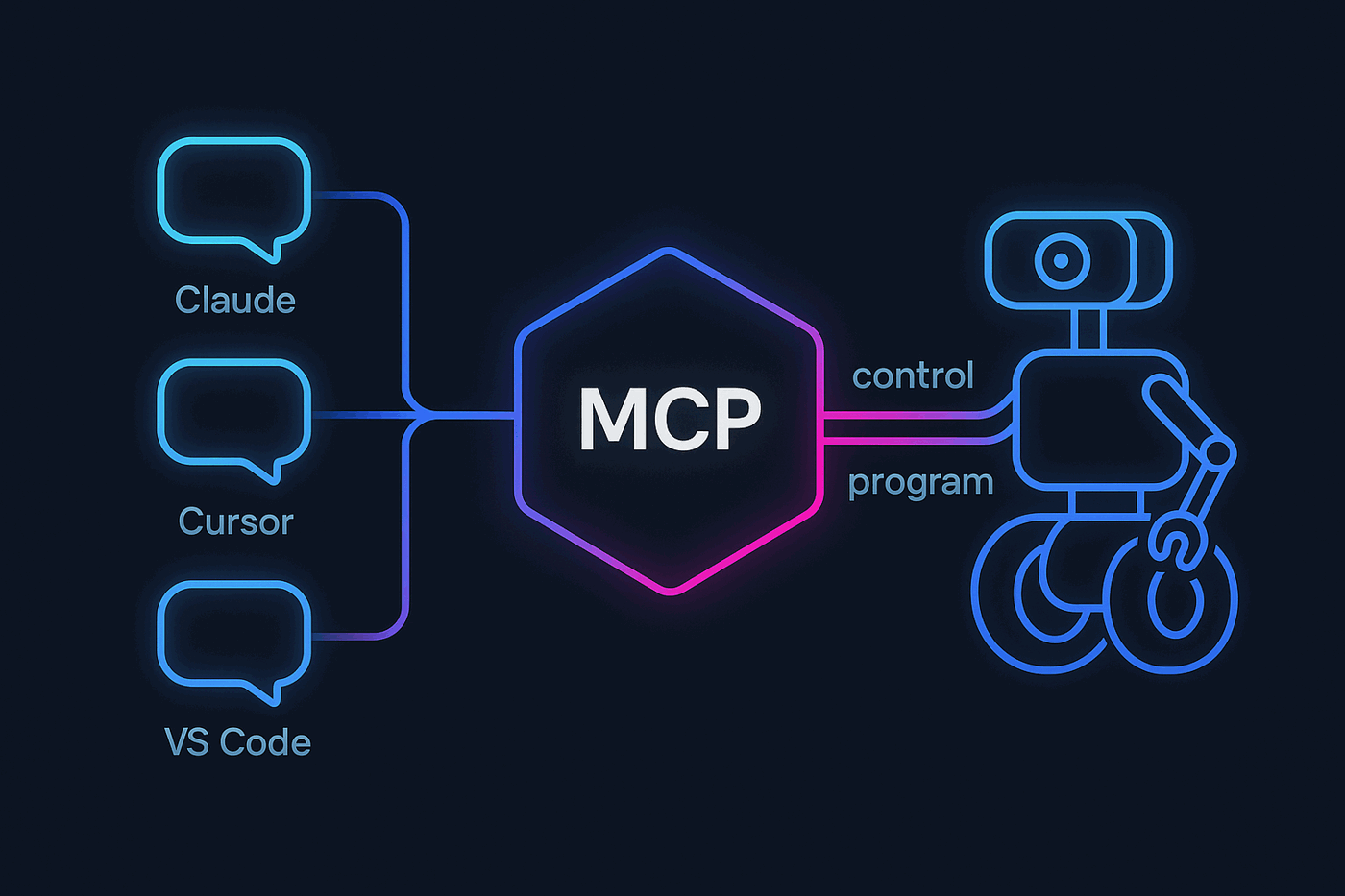
- An MCP server, so Claude, Cursor or any AI agent can see, drive and program the robot.
- Drag-and-drop Custom UI screens for phones, tablets and kiosks.
- A VS Code-style script editor with IntelliSense and an AI script assistant.
ARCx platforms and specifications
| Platforms | Windows 10 and 11 (64-bit); Ubuntu 24.04 LTS on x64 and ARM64, including Raspberry Pi |
|---|---|
| Interface | Web browser, from the robot's computer or any device on the network, several at once |
| Network access | Local computer only by default; open to the network with a bind address; HTTPS with your own certificate |
| Remote ARCx | The full interface from any browser in the world through synthiam.com; outbound connection from the robot, so no port forwarding or VPN; Synthiam sign-in and a per-owner access list; off by default |
| Scripting | Blockly, JavaScript, Python (IronPython 3.4 built in; CPython through the Python Native skill) |
| Script editor | VS Code-style editor with IntelliSense, problems panel, console, snippets and an AI script assistant |
| Vision | OpenCV; USB cameras and EZB WiFi cameras |
| Speech | Pluggable speech synthesis and recognition engines, cloud and offline, with wake words |
| Extensibility | Robot skills — independent modules, hot add and remove, published to the Synthiam skill store |
| AI | Athena, with project read and write access and approval-gated changes; Autonomous AI skill for cloud and local LLMs |
| MCP server | Model Context Protocol server for Claude, Cursor, VS Code Copilot, ChatGPT and any MCP client; Streamable HTTP at /mcp and a stdio bridge; tools for the robot and the project, resources, and Robot Skill tools; permission switches and an access token |
| User interfaces | Custom UI designer with 20+ widget types and skill-provided widgets |
| Controllers | Multiple EZB-firmware controllers per project, auto-discovered, over USB serial or the network |
| Integrations | ROS 2 through rosbridge; gamepads and HID devices; browser windows on attached displays |
| Account | Sign in with a Synthiam account; Athena uses AI credits |
| Status | Windows 64-bit, Linux 64-bit and Linux ARM64 (Raspberry Pi) available to download |
Download ARCx
Install ARCx on the computer that runs your robot — from a first prototype to a commercial product or an industrial cell. Available for Windows 64-bit, Linux 64-bit and Linux ARM64 for Raspberry Pi (Ubuntu 24.04 LTS 64-bit).
Linux
Ubuntu, Debian & friends
64-bit (x64) (zip)
Raspberry Pi
Single board computers
Linux ARM64 (zip)
Requires Ubuntu 24.04 LTS (64-bit)
ARCx is always evolving. Follow along in the community for updates.
Follow ARCx development Download ARC today
Start programming robots with ARCx
Install Synthiam ARCx on the computer that runs your robot and program it from a browser — from the first prototype to a product or a production line. Building a DIY robot or teaching a class? Synthiam ARC is the Windows desktop platform made for hobbyists and education, with access to the full Robot Skill Store.
Get Synthiam ARCx Get Synthiam ARC Getting Started Guide