
 Resolved by
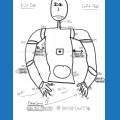
Hi I am sure this is someplace in the threads, but I cant find a good tutorial
How would one use script to have each grid of the camera "trigger" and end specific events ? Example:
Something happens in far right middle grid then X will happen then end when its no longer there ...ect
Sorry if the answer is right in front of me but I am still noobish with scripting

Go into the camera control look under the second tab called scripts... in there you will see a sub tab beginning with Tracking. The second tab is Variables... In there are pre defined variables that you can use in your scripts to give you what you want to do....
Thx I knew it was right in front of me ( this is what happens when I try doing stuff after work ) stress