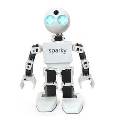

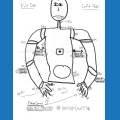
how can i calibrate the servo's to 45 degrees for the galapagosbot?
Asked
— Edited
 Resolved by Dunning-Kruger!
1 Participant

 Watson Speech To Text
— Watson Speech-to-Text ARC plugin: cloud AI transcription with configurable models, selectable VAD (Windows/WebRTC), audio capture and visualization.
Try it →
Resolved by Dunning-Kruger!
how can i calibrate the servo's to 45 degrees for the galapagosbot?

Calibrate all servos to 90.... That gives you a centre of reference... If you need 45 then just move the servo to 45 in whatever pose you need 45 in...
@nomad all calibration is... is to show you the servo is where it supposed to be when you move it to a position.... That's why you start with 90... if the servo is straight then it is calibrated correctly...
rr
the instructions says it to set it -45 degree for assemble. so first callibrate and then a script for all servo's?
I'll let ez robot respond as I don't have one to check....
rr
ah ok.
dj or any off the staff can give the correct calli.i allreddy burn 3 servo's.
please
Calibrate all your servos to 90 (see picture below) then set them to the positions you see above.... I just did it... I laid out all the servos for Galapagos bot on the table and set them at the values in the above picture you posted... All of the servos were oriented correctly and were set to 90 in their brackets as below prior... Calibrate to 90 (picture) then set them like the picture above...
Servo calibrated correctly to 90 in it's bracket
Try it.. take a servo by it's self and calibrate to 90 as the picture I posted above... Then move it to position 145 with the servo control... Now look at your servo and the picture you posted... It should look the same as the servo attached to D0