




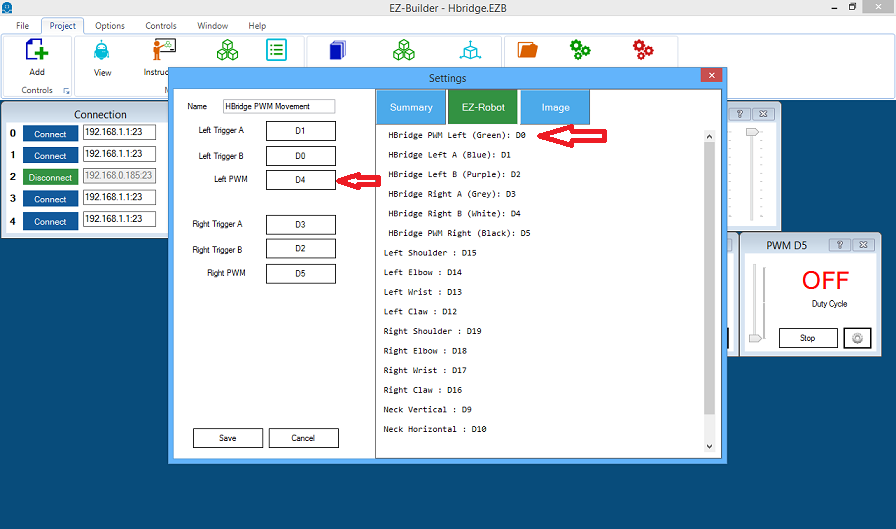
i am trying to use the hbridge.it only works on connection 0 and i need it to work on connection 2 then i saw this see pic.tutorial doesn seem correct .
 Sound Servo (PC Mic)
— Maps PC microphone volume to servo positions - control multiple servos (e.g., robotic mouth) with scalar, min/max and invert options.
Try it →
i am trying to use the hbridge.it only works on connection 0 and i need it to work on connection 2 then i saw this see pic.tutorial doesn seem correct .

dave
i try that thanks the hbridge goes only on connection 0 so the mecanoid on connection 1
I'm not sure you saw my EDIT in my last post. If you're indeed have the second EZB on connection 2 then there may be nothing wrong with the way you are calling the EZB's (but I haven't seen your project). I'm not sure if skipping a connection (having two EZBs connected to connection 0 and 2 without one on connection 1) will cause problems. My guess is it won't.
yes thats the problem ,bolt saying not connected to connection 0 there can be only one per connection.
Do you have a auto connect in your INT file (if you have one) to all three connections (0,1 & 2) Assuming that you dont have a EZB connected to connection 0 can't you just not try to connect to connection 0 and only have a auto connect to connection1 & 2?
no auto connect.
connection 0 works with hbridge sofar good. problem starts with second one,connetion 1
i dont know how to do auto connect. the hbridge only works on connection 0
bolt ezbv4 wanne be on connection 0 ? connection 1 connects but dont do the script 1 the pic is from ezbv4 connection 1 script 1