Community Robot Questions 4 Series Bar Chart leversofpower USA Asked Oct 2015 — Edited Oct 2015 4 Participants DJ Sures JustinRatliff Herr Ball Dunning-Kruger 4 Series Bar Chart ARC Skip to comments Jump to end First plugin. Check the plug in's section. Let me know if you can use it. EZ Chart EZChart.zip Quote Jump to end Upgrade to ARC Pro ARC Pro will give you immediate updates and new features needed to unleash your robot's potential! Compare Pro Features View Subscription Plans DJ Sures PRO Synthiam #17 Oct 2015 Just used your plugin - i like the color change. I have a suggestion for the RGB values. Currently they are specified in a string... ControlCommand("EZ Chart", SetSeriesColor, 0, "50,50,50") It would increase versatility if each color was specified separately like so... ControlCommand("EZ Chart", SetSeriesColor, 0, 50, 50, 50) Because then you could do this... repeat($red, 0, 100, 10) ControlCommand("EZ Chart", SetSeriesValue, "Series1", $red) ControlCommand("EZ Chart", SetSeriesColor, 0, $red, 10, 10) sleep(100) endrepeat Reply Quote Share leversofpower USA #18 Oct 2015 Great, idea. For some strange reason I think I took the more obtuse way doing that by using a string. Will do for next release. Reply Quote Share DJ Sures PRO Synthiam #19 Oct 2015 awesome - looking forward to it! I've been using the graph control for visualization. Any idea if you will be making a historical line graph in the future? Reply Quote Share Dunning-Kruger Canada #20 Oct 2015 Nice work @leversofpower.... I can use this as a graphical monitor for my ezb and roomba battery voltages.... It would also be awesome to use if you had 3 or 4 pings across the front or around your robot in order to monitor various distances.... Reply Quote Share «« « 1 2 3 Login to post a comment
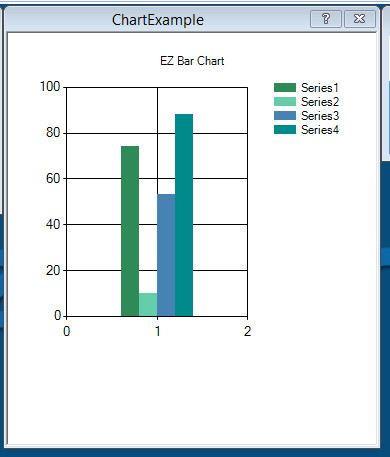
leversofpower USA Asked Oct 2015 — Edited Oct 2015 4 Participants DJ Sures JustinRatliff Herr Ball Dunning-Kruger 4 Series Bar Chart ARC Skip to comments Jump to end First plugin. Check the plug in's section. Let me know if you can use it. EZ Chart EZChart.zip Quote Jump to end
DJ Sures PRO Synthiam #17 Oct 2015 Just used your plugin - i like the color change. I have a suggestion for the RGB values. Currently they are specified in a string... ControlCommand("EZ Chart", SetSeriesColor, 0, "50,50,50") It would increase versatility if each color was specified separately like so... ControlCommand("EZ Chart", SetSeriesColor, 0, 50, 50, 50) Because then you could do this... repeat($red, 0, 100, 10) ControlCommand("EZ Chart", SetSeriesValue, "Series1", $red) ControlCommand("EZ Chart", SetSeriesColor, 0, $red, 10, 10) sleep(100) endrepeat Reply Quote Share
Just used your plugin - i like the color change. I have a suggestion for the RGB values. Currently they are specified in a string... ControlCommand("EZ Chart", SetSeriesColor, 0, "50,50,50") It would increase versatility if each color was specified separately like so... ControlCommand("EZ Chart", SetSeriesColor, 0, 50, 50, 50) Because then you could do this... repeat($red, 0, 100, 10) ControlCommand("EZ Chart", SetSeriesValue, "Series1", $red) ControlCommand("EZ Chart", SetSeriesColor, 0, $red, 10, 10) sleep(100) endrepeat
leversofpower USA #18 Oct 2015 Great, idea. For some strange reason I think I took the more obtuse way doing that by using a string. Will do for next release. Reply Quote Share
Great, idea. For some strange reason I think I took the more obtuse way doing that by using a string. Will do for next release.
DJ Sures PRO Synthiam #19 Oct 2015 awesome - looking forward to it! I've been using the graph control for visualization. Any idea if you will be making a historical line graph in the future? Reply Quote Share
awesome - looking forward to it! I've been using the graph control for visualization. Any idea if you will be making a historical line graph in the future?
Dunning-Kruger Canada #20 Oct 2015 Nice work @leversofpower.... I can use this as a graphical monitor for my ezb and roomba battery voltages.... It would also be awesome to use if you had 3 or 4 pings across the front or around your robot in order to monitor various distances.... Reply Quote Share
Nice work @leversofpower.... I can use this as a graphical monitor for my ezb and roomba battery voltages.... It would also be awesome to use if you had 3 or 4 pings across the front or around your robot in order to monitor various distances....






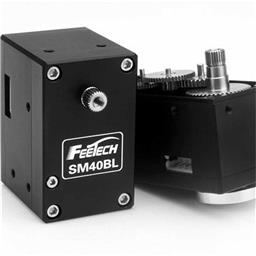 Feetech RS485 Servo
— Control Feetech serial bus smart servos via EZB UART or PC COM port in ARC using virtual ports mapped to servo IDs.
Try it →

Just used your plugin - i like the color change. I have a suggestion for the RGB values.
Currently they are specified in a string...
It would increase versatility if each color was specified separately like so...
Because then you could do this...
Great, idea. For some strange reason I think I took the more obtuse way doing that by using a string. Will do for next release.
awesome - looking forward to it! I've been using the graph control for visualization.
Any idea if you will be making a historical line graph in the future?
Nice work @leversofpower.... I can use this as a graphical monitor for my ezb and roomba battery voltages.... It would also be awesome to use if you had 3 or 4 pings across the front or around your robot in order to monitor various distances....