






When setting up an Auto Position Frame, how do I select which EZB Controller?
RichardZ
 Auto Position (Gait)
— Create servo frames and actions to animate gaits and gestures with automatic motion planning, software ramping, movement panel, import/export
Try it →
When setting up an Auto Position Frame, how do I select which EZB Controller?
RichardZ

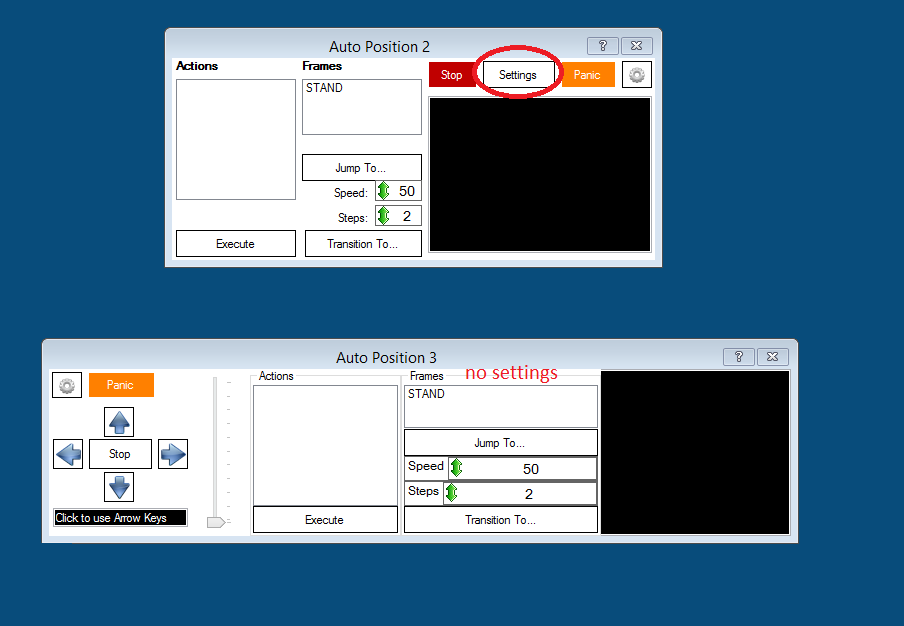
i think this is a good pic for explanning it. no settings.
here a pic with drop down list to choose connections.
Thanks everyone...
This is why I love this forum... so much good advice
Frank
Hey frank - also see where it highlights in when people type Movement Panel ? Click on that because it's got some good info. Explains in more detail why movement panels work the way they do - and how they integrate with the software.
The new normal version of ARC does not have the settings at all for the movement panel.
This thread is outdated and is 3 years old. The way to select the ezb index is during selecting the servo in the Auto Position editor...