


Sphero Movement Panel icon Sphero Movement Panel — Control Sphero via Bluetooth in ARC. Detects two COM ports (one connects); requires deleting and re-pairing after disconnects or reboots. Try it →
Tutorial
Published — Updated

The Robot Program Episode 021: Detect Face And Wave - Blockly

Step 15 of 22
Step 14

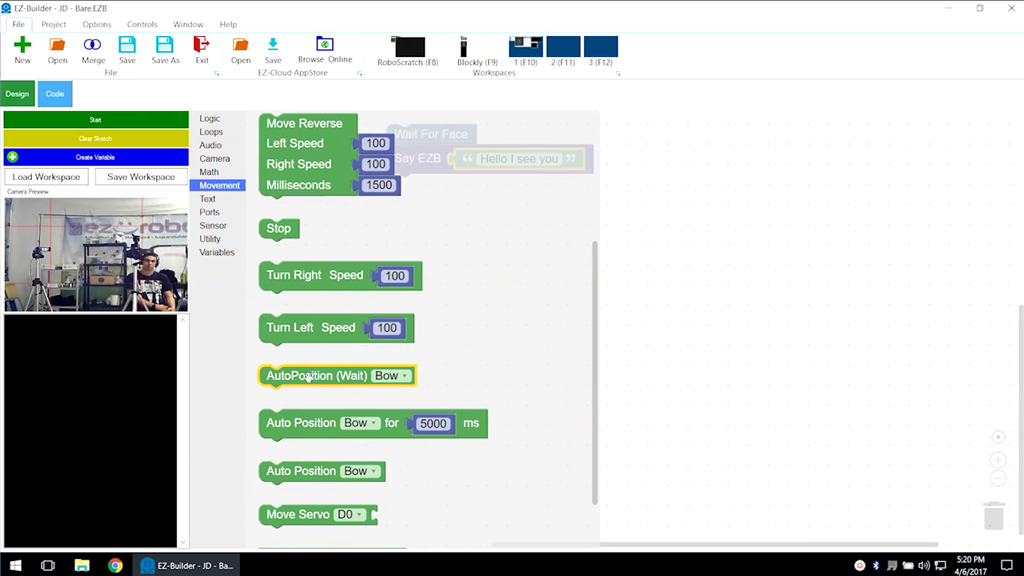
Select Movement from the menu, then click and drag AutoPosition (Wait) underneath the previous command.

Functions that have b[/b] in their name will run completely before moving on to the next command.

User-inserted image


ARC Pro

Upgrade to ARC Pro

Stay at the forefront of robot programming innovation with ARC Pro, ensuring your robot is always equipped with the latest advancements.